Last updated: 22 October 2026. Written by Ritesh Kanjee, director of Augmented AI.
You can turn a single photo into a talking avatar with Kling 2.6 motion control and an automation workflow. The workflow takes a photo and a reference video from Google Drive, and Kling copies the motion onto the image to create the avatar. You get video content without cameras, lights or actors, at a fraction of the effort.
I recently posted a demo on LinkedIn featuring digital avatars mimicking human motion. The response was massive, seeing over 24,000 impressions and hundreds of comments.
Why build an avatar workflow?
Why? Because companies are desperate for content, but traditional video production is slow and expensive. It requires cameras, lights, and actors. We are currently stuck at Level 1, doing everything manually.
Today, I’m walking you through a workflow that pushes you to Level 2 and Level 3. We are going to use AI to “puppet” any image using a reference video. The goal isn’t just to make cool videos; it’s to build a system that creates content while you sleep.
How well does Kling 2.6 motion control work?
I tested this workflow using the Kling 2.6 model. I used a few celebrity images for educational purposes to see how the model handled familiar faces.
What works well
- Motion Accuracy: The AI tracks movement incredibly well.
- Detail: It handles things AI usually hates, like teeth and complex facial angles.
- Physics: The hair movement is consistent and looks real.
What still goes wrong
- Anatomy Glitches: In one test, Henry Cavill ended up with swollen arms, it looked painful.
- Likeness Drift: Sometimes the face loses its identity slightly during rapid movement.
Even with the glitches, this is faster than hiring an animation team. We are taking a static image and a reference video, and merging them.
How do you build the workflow?
We don’t do this manually; we automate it using a workflow tool. Think of a workflow tool as a digital assembly line. We put raw materials in one end, and a finished product comes out the other.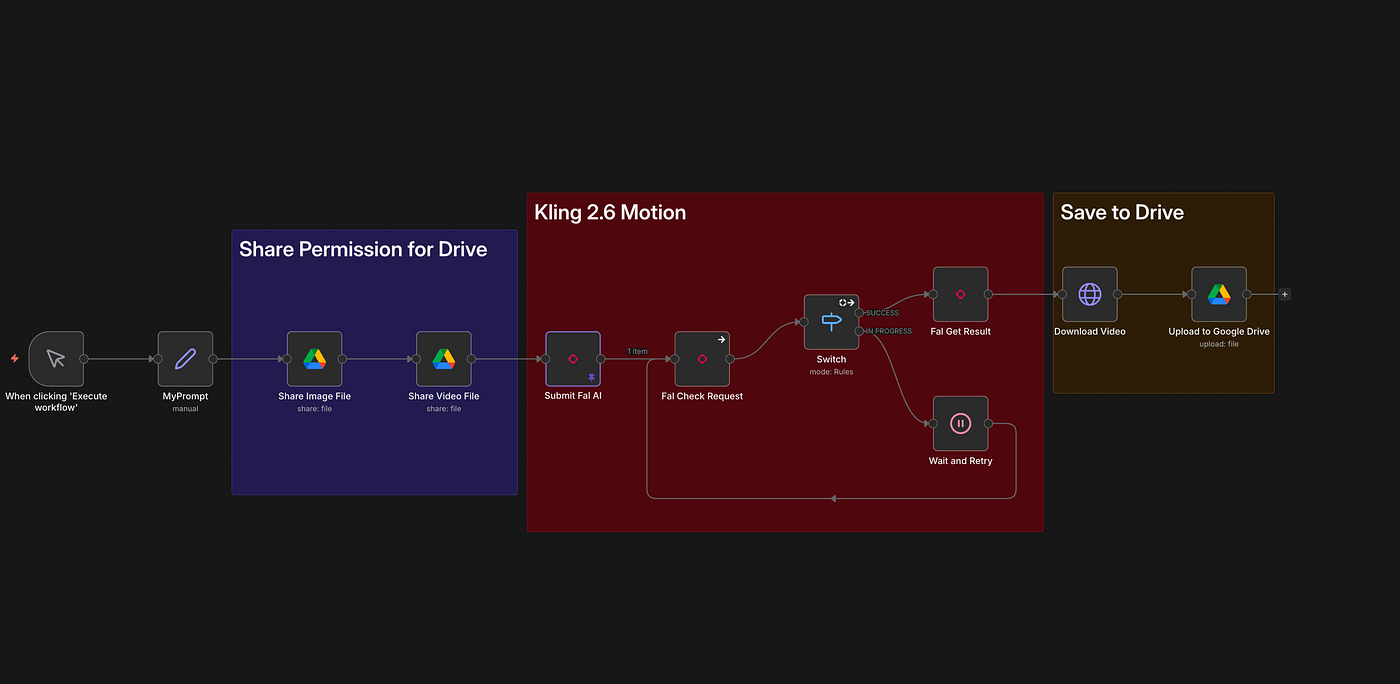
What is the workflow logic?
- The Trigger: You start the process (form, chat, or schedule).
- The Inputs: You provide the Source Image (the face) and the Driver Video (the motion).
- The Processor: We send these assets to Fal AI running the Kling 2.6 model.
How does the workflow connect to the API?
A specific hurdle is Google Drive permissions. Your AI tools need to “see” your files. In a workflow tool, we automate the sharing process by taking the file ID, changing the permissions to “anyone with the link,” and generating a direct URL. If you skip this, the automation fails.
Once accessible, we send a request to Fal AI via a Community Node. You will need your API keys and select the kling-video-v2.6-standard (or Pro) model.
How does the workflow wait for the video?
Video generation takes time (e.g., 7 minutes for a 5-minute video). If you ask for the video immediately, the system will error out. We build a loop:
- Send Request: “Hey Fal AI, make this video.”
- Wait: The system pauses for 30 seconds.
- Check Status: “Is it done yet?”
- Repeat: If “in progress,” we wait again.
- Completion: Once “Completed,” the system downloads and saves it to Google Drive.
Why does this matter for your business?
This is about scalability. Imagine a CEO avatar: you record one video of an actor speaking, and you can now drive that avatar with new audio and motion without the CEO ever entering a studio. That is Level 3 automation.
What are the next steps?
We will eventually integrate ElevenLabs to transform voices into different accents or genders to match the avatar perfectly.
If you are not tech-savvy, I have provided the full detailed instructions, workflow code, and steps in our Corporate Automation Library (CAL).
Click Here to gain access to CAL.
We have over 60+ high impact, high ROI automations, including:
- Automatic LinkedIn post generators.
- Cloning yourself as a presenter.
- Newsletter automation.
- Lead scraping (50,000+ leads).
Stop building from scratch. Start automating.
Ritesh Kanjee Automations Architect & Founder Augmented AI (121K Subscribers | 58K LinkedIn Followers)