
Last updated: 22 October 2026. Written by Ritesh Kanjee, director of Augmented AI.
Cursor Crash Course: The Ultimate Beginner's Guide to AI-Powered Automation
To build AI-powered apps with Cursor, start from an automation boilerplate, describe what you want in Agent mode, and let the agent write, run and fix the code while you review. Connect MCP tools for services such as databases and browsers, test the interface automatically, then deploy. This crash course walks through each step for beginners.
---
What is Cursor IDE?
An Integrated Development Environment (IDE) is the central workspace where developers write, edit, and compile their code. Traditional IDEs require extensive manual configuration, package installations, and terminal commands before a single line of code can be written. Cursor reimagines this entire experience by natively embedding advanced artificial intelligence directly into the core editor.
This AI-first architecture allows you to work seamlessly using an innovative agent window or a traditional single-project view. The single-project layout is ideal for developers who want to focus intensely on one codebase without distractions. Conversely, the agent window enables you to run multiple background processes simultaneously, significantly accelerating your overall development speed.
To begin a project, you do not need to deal with complex configuration setups or rigid project directory files. You simply open any empty folder on your computer, and the editor instantly prepares a clean canvas for your development. This frictionless entry point allows beginners to transition from an initial idea to active coding in seconds.
---
How Does the Agent Mode Differ from Other Cursor Modes?
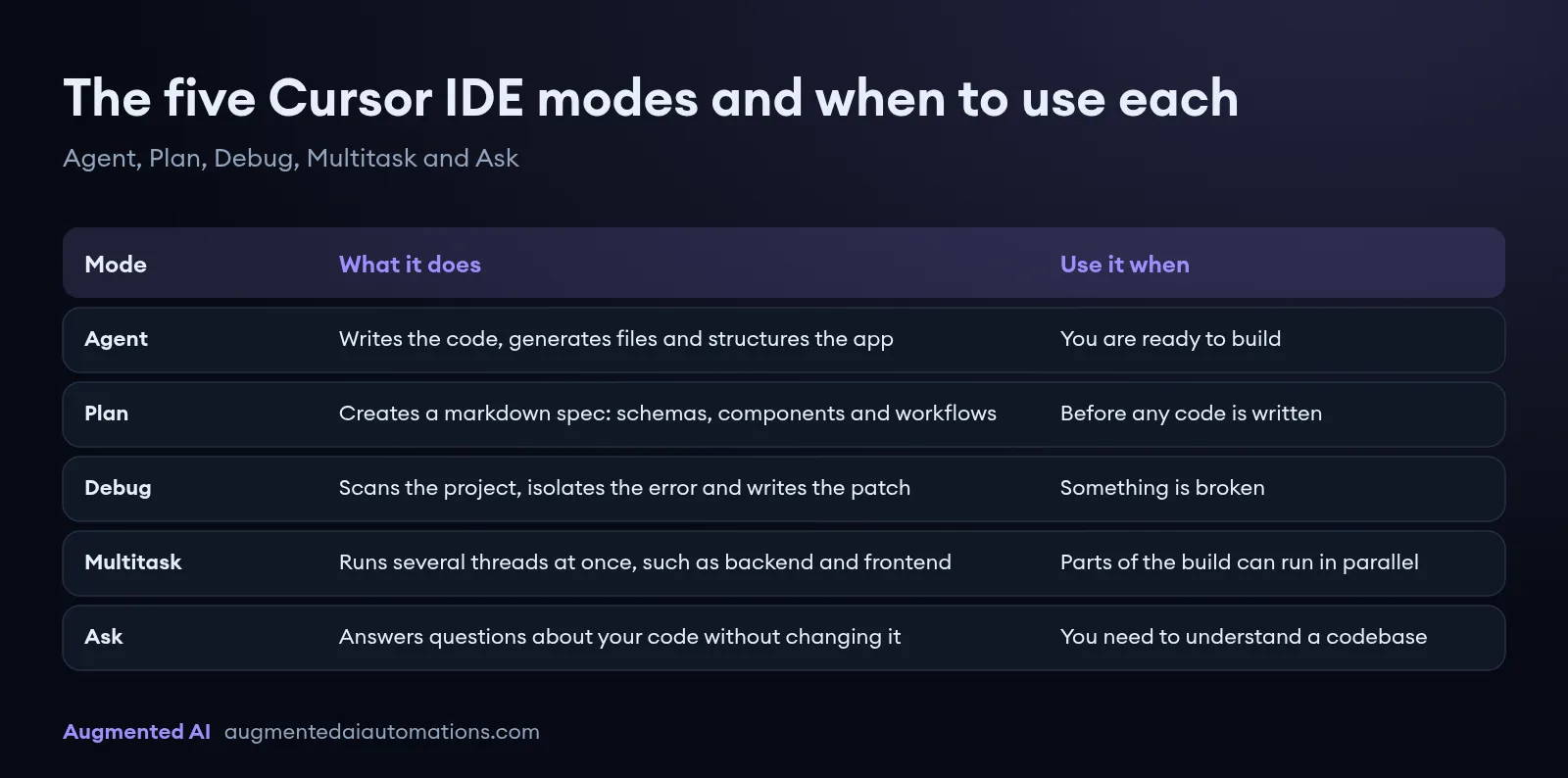
Cursor organizes its artificial intelligence capabilities into five specialized operation modes to handle different stages of development. These modes include Agent, Plan, Debug, Multitask, and Ask, each tailored to perform specific software engineering tasks. Understanding when to deploy each mode is crucial for streamlining your business automation projects.
The Agent mode acts as your primary engine for actual application construction and code execution. When you assign a task to the agent, it autonomously writes the necessary code, generates files, and structures your application without manual typing. It acts as a highly capable, tireless developer that executes complex software commands directly within your local environment.
The Plan mode is designed to guide you through the architectural phase of a project before any code is generated. When prompted, the AI creates a structured markdown document outlining your database schemas, component hierarchies, and visual workflows. This planning stage ensures that you and the AI are fully aligned on the project specification before writing code.
The Debug mode is specifically engineered to identify, isolate, and resolve technical errors in your codebase. Instead of spending hours hunting through error logs and tracebacks, you can direct the debugging tool to scan your project. It will analyze the issue and automatically write the exact patch needed to restore flawless performance.
The Multitask mode enables you to parallel-process several development actions across various parts of your codebase simultaneously. For example, you can instruct one thread to design a backend API database while another thread works on styling your frontend layout. This parallel computing capability dramatically minimizes development bottlenecks during complex application builds.
Finally, the Ask mode functions as an intelligent, non-destructive informational assistant for your codebase. It reviews your active files and answers complex structural questions without making any changes to your code. This is an indispensable tool when you are trying to understand legacy systems or analyze complex third-party APIs.
---
What is an Automation Boilerplate and Why is it Vital?
An automation boilerplate is a pre-built starter kit containing structural code, responsive UI elements, and standardized layout templates. Using a boilerplate ensures that all the applications you build maintain a highly professional and consistent design aesthetic. This foundation prevents the AI from generating unpredictable, chaotic user interfaces that look amateurish.
When you feed a specific boilerplate into Cursor, you provide the AI with a strict design framework to follow. This design constraint ensures that buttons, navigation menus, and color palettes match your agency's standard layout. As a result, the AI can build beautiful, cohesive dashboards that look consistent across different clients.
You can access these premium dashboard templates and UI starter kits directly from structured learning platforms like the Corporate Automation School. These resources are designed to work smoothly with modern AI coding editors, allowing you to deploy functional products in minutes. Utilizing standardized boilerplates is the single best way to scale your software automation business.
---
Which MCP Tools and Integrations Work Best with Cursor?
The Model Context Protocol (MCP) is a powerful system that connects your AI editor to various external software applications. By enabling MCP tools, you allow Cursor to interact directly with web browsers, databases, and payment APIs. This connectivity transforms a simple code generator into a fully autonomous business automation system.
For a robust tech stack, you should integrate services like Vercel for instant hosting and Convex for real-time databases. To handle monetization, Stripe can be added for secure payment processing, while Figma translates UI designs into working code. For data extraction, web search engines like Firecrawl, Tavily, and Apify provide superior scraping capabilities.
Let us compare the primary MCP tools and integrations that you can configure inside the Cursor marketplace. Each of these tools serves a distinct role in turning basic software into enterprise-grade automation.
| Tool Name | Tool Category | Primary Business Automation Purpose |
|---|---|---|
| Vercel | Cloud Hosting | Rapid deployment and hosting of user-facing dashboards. |
| Convex | Real-Time Database | Secure, real-time data storage and state management. |
| Stripe | Payments & Billing | Processing customer subscriptions, transactions, and invoices. |
| Notion | Project Management | Tracking development tasks, timelines, and software specs. |
| Figma | UI/UX Design | Converting visual design prototypes directly into active source code. |
| Firecrawl | Web Scraping & Search | Extracting clean markdown data from target websites for analysis. |
| Apify | Lead Generation | Automated scraping of corporate leads and web contacts. |
Installing these integrations into your workspace is a simple process that requires minimal technical configuration. If a tool is not available in the standard marketplace, you can paste its GitHub repository URL directly into your settings. Cursor will instantly analyze the repository, configure the custom tool, and add it to your active development toolbox.
---
How Do You Start an Automation Project in Cursor?
Building an application with this next-generation editor is a smooth process that bridges natural language planning and automated execution. By following a structured workflow, you can convert abstract business ideas into working production apps in minutes. Here is the exact step-by-step framework to launch and deploy your first project.
- Create a Clean Folder: Start by creating an empty directory on your computer, such as a folder named "dev1," and open it in the editor. This clean workspace serves as the root directory where the AI will generate all your custom application assets and code files.
- Launch the Plan Mode: Select the Plan mode and use your voice to dictate the exact specifications of the application you want to build. For example, explain that you need an agricultural dashboard with IoT sensor displays, heat maps, and simulated drone trajectories.
- Attach Your Boilerplate Template: Upload or reference a standardized dashboard starter kit from the Corporate Automation School to lock in the visual styling. This ensures that the generated interface remains clean, modern, and aligned with your brand's aesthetic guidelines.
- Review the AI Specification Plan: Carefully read through the comprehensive markdown plan, complete with structural flowcharts and interactive to-do lists, generated by the AI. You can manually edit this document to make specific adjustments before the code generation begins.
- Generate Code in Agent Mode: Switch over to the Agent mode and instruct the AI to build out the application files and generate realistic mock data. The agent will autonomously create directories, write backend logic, and style UI components based on your plan.
- Perform Local UI Verification: Launch the built-in browser preview tool to see your newly created application run live on your local machine. This allows you to verify that all the buttons, graphs, and layout grids function exactly as intended.
- Deploy and Version Control on GitHub: Initialize a local Git repository within your workspace and save your changes with an initial commit. You can then publish your repository to GitHub with one click, securing your code for future updates.
---
How Does Cursor Perform Automated Browser UI Testing?
One of the most impressive and time-saving features in Cursor is its ability to perform autonomous UI testing. Once your initial code is generated, the AI agent can take control of your local web browser to test user paths. It clicks interactive buttons, types data into input forms, and navigates different pages to verify everything works.
If the automated testing sequence discovers any visual errors, broken layouts, or unresponsive buttons, it takes immediate action. The AI agent analyzes the visual bug, rewrites the problematic styling code, and applies a permanent patch. This self-healing mechanism guarantees that your application is highly polished before it ever reaches a real user.
In traditional web development, testing and debugging consume more than half of the total project timeline. By automating this entire browser testing process, you save hours of tedious manual inspections and corrections. This advanced capability allows you to deliver error-free software solutions to your clients at record speeds.
---
How Can Businesses Monetize Cursor for Automation?
The massive drop in the barrier to entry for software development has created an incredibly lucrative market for automation agencies. By utilizing AI-powered workflows, developers can build enterprise-grade apps in a fraction of the time it once took. This dramatic increase in efficiency allows you to scale your business operations and maximize your profit margins.
For instance, Ritesh Kanjee has leveraged this technology to charge major corporate clients anywhere from $100,000 to $200,000 for custom software delivery. Because the AI builds the application in less than an hour, your business model shifts from selling hourly labor to selling premium value. This transition allows you to generate massive revenues while working fewer hours.
To protect your profits in this fast-paced environment, you must master the art of client project scoping. Because software is produced so rapidly, clients will often ask for additional features, causing severe scope creep. You must establish a clear scope of work up front and bill for any extra requests through structured change orders.
---
FAQ
What is the monthly cost of using Cursor?
Cursor offers a highly flexible pricing model that begins with a professional tier costing $20 per month. This subscription gives you unlimited access to basic operations and a highly generous monthly quota of fast premium AI models. If you happen to exceed this quota, you can seamlessly transition to on-demand pricing to prevent work interruptions.
Can I use different AI models within Cursor?
Yes, you can easily select and toggle different artificial intelligence models directly from your editor settings. You have access to Cursor's optimized internal models like Grok, alongside external options like Gemini 2.5 Flash, Claude Opus, and GPT-4. This flexibility allows you to choose the perfect reasoning engine for your specific development task.
Do I need a background in computer science to use Cursor?
You do not need a computer science degree or advanced programming knowledge to build powerful applications with Cursor. The editor uses natural language processing and voice dictation to translate your thoughts directly into working source code. However, having a basic understanding of software concepts and APIs will help you manage complex business automations.
How does the Model Context Protocol (MCP) benefit business automation?
The Model Context Protocol acts as a highly efficient bridge that connects your AI editor with external APIs and data sources. It enables your AI agent to perform complex operations like scraping sales leads, processing Stripe invoices, and updating project boards. This turns a standard text editor into an autonomous workspace that handles entire business workflows.
What is the role of GitHub in a Cursor workflow?
GitHub serves as your primary cloud storage and version control system, ensuring that your valuable codebase is always backed up safely. Inside Cursor, you can initialize a local Git repository, track every single file modification, and publish directly to GitHub. This system makes it simple to revert bad code changes and collaborate with other developers.
How does voice dictation improve the coding process?
Voice dictation allows you to explain complex business logic and dashboard features much faster than manual typing. By speaking naturally to the AI, you can describe how database models connect or how a UI dashboard should function. Cursor processes your spoken words to generate precise planning documents and functional code structures instantly.
Why is scoping the hardest part of AI development?
Scoping is the most challenging aspect because AI tools make software creation look so fast and effortless to clients. When clients see how quickly their initial dashboard is built, they naturally begin demanding extra features and design revisions. Establishing a strict scope of work before starting protects your profit margins and prevents unpaid scope creep.
---
Summary
Cursor represents a monumental shift in the way modern applications and enterprise automations are built. By combining autonomous AI agents, standardized boilerplates, and powerful MCP tool integrations, anyone can build high-ticket software in minutes. The value of a developer is no longer measured by manual typing speed, but by strategic scoping and solution architecture.
If you want to accelerate your company's growth and implement advanced AI systems that drive massive profits, let us help. Please visit our work-with-me page to find out how we can partner to build your next custom automation solution. Let us collaborate to unlock the true potential of automated systems for your enterprise today.