
Last updated: 22 October 2026. Written by Ritesh Kanjee, director of Augmented AI.
AI content automation uses connected AI models and workflows to turn one master asset, such as a video transcript, into platform-ready text and images automatically. At Augmented AI, we build custom systems that turn a single video into eight optimised social media formats in under 10 minutes, which removes manual copywriting entirely.
I built this because copying and pasting into chat tools all day was eating my time. The same approach has helped me reach over 1.4 million impressions on LinkedIn in a single year and saves me over 4 hours a day. This article covers how the workflow works, the local model setup, client results and how to build your own.
What is AI content automation?
It is the systematic use of AI models to take in raw source material and output fully formatted content for several channels. Basic AI generation depends on manual, repeated prompting. An automated system runs through structured workflows instead, handling everything from token optimisation to multi-channel distribution on its own.
We describe this as moving from "chatting with AI" to building structured business engines. Instead of pasting text into ChatGPT or Gemini dozens of times a day, we build pipelines that take one long-form video, analyse the transcript, and produce tailored assets for every platform in seconds. You keep the natural value of your spoken videos and let software handle the tedious formatting, so you can stay present on many channels without burning out.
Why is manual copy-pasting a growth bottleneck?
Manual repurposing is repetitive and eats hours of creative time every day. A typical creator records a video, transcribes it, then logs into five or six apps to draft emails, LinkedIn posts and community announcements. Each new chat window starts from a blank slate, so the brand voice drifts and needs constant correction. Moving text back and forth between interfaces also limits how often you can post.
We built the Marketing OS Content Repurposer to solve exactly this. Automating the work frees people for higher-value strategy, and in my own case it let me grow reach across several networks while saving over 4 hours a day.
How does our workflow turn 1 video into 8 assets?
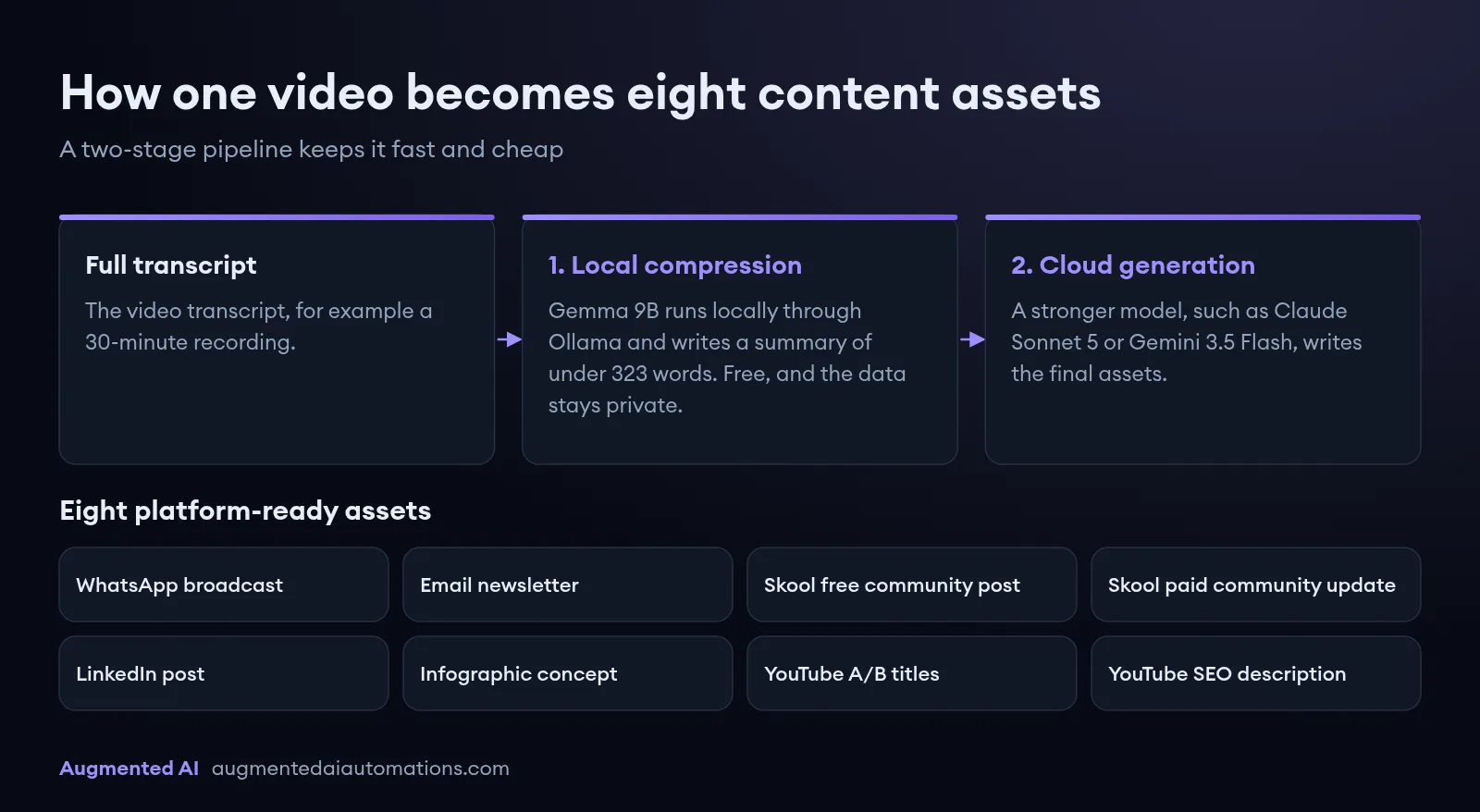
The system uses a tiered design so it stays fast and cheap. Sending a 30-minute transcript straight to cloud APIs is expensive and burns through token limits, so the work is split into two stages:
- Local compression. A lightweight Gemma 9B model, running locally on a MacBook through Ollama, reduces the full transcript to a high-fidelity summary of under 323 words. Because this runs on your own hardware, it is free and your data stays private.
- Cloud generation. The summary goes to a stronger model, such as Claude Sonnet 5 or Gemini 3.5 Flash, which writes the final assets.
The second stage produces eight platform-ready assets at once:
| Asset | What it is |
|---|---|
| WhatsApp broadcast | A short, conversational update for quick mobile reading |
| Email newsletter | A structured, value-first story with clear formatting and calls to action |
| Skool free community post | An educational write-up to engage and nurture prospects |
| Skool paid community update | Deeper technical insight for high-tier coaching students |
| LinkedIn post | Copy written for the LinkedIn feed, with a hook and readable spacing |
| Infographic concept | Layout instructions and prompts for image generation tools |
| YouTube A/B titles | Several title options based on hook formulas, for click-through testing |
| YouTube SEO description | A video summary with chapter guidance and resource links |
How do you set up a local LLM to cut token costs?
Run a local model for the heavy summarising step, so repeated tasks cost nothing in API fees and confidential transcripts never leave your machine. The setup takes three steps:
- Install Ollama on your computer to manage and serve open-source models.
- Download Gemma by running
ollama run gemma2:9bin your terminal. It is strong at summarising and fits on standard business hardware. - Connect the local instance to your automation dashboard through its API endpoint at
http://localhost:11434, with a system prompt telling the model to condense the text. In our setup it returns a clean, structured summary in under 12 seconds, ready for the cloud stage.
How do local LLMs compare with cloud APIs for repurposing?
Each has a clear strength, and the best results come from using both: local models for compression and secure analysis, and cloud APIs such as Claude for the final, persuasive copy.
| Factor | Local LLMs (for example Gemma 9B, Llama 3) | Cloud APIs (for example Claude Sonnet 5) |
|---|---|---|
| Running cost | Free per token once the hardware is set up | Pay per token, which can add up quickly |
| Speed | Fast local runs (under 12 seconds for our summaries) | Depends on network latency and API load |
| Nuanced copywriting | Moderate: best for structure and summaries | Very high: best for adapting to a brand voice |
| Hardware | Apple Silicon Mac or a dedicated GPU | Any device with an internet connection |
What results have automated systems delivered for clients?
Moving from manual prompting to structured systems gives a clear, measurable return. These are projects my team at Augmented AI has delivered:
- Aussie Group: we automated their complex visa document processing, cutting manual processing time from 8 hours to 4 hours and effectively doubling staff output.
- Tshwane University of Technology: we built a secure, offline version of NotebookLM, and the custom integration cut their video course development timeline from 6 months to 2 weeks.
- Momentum: we automated their manual form generation, turning a frustrating 3-day workflow into a 10-minute operation.
To see how a custom system could work in your operations, you can work with Augmented AI.
How do you build your own content repurposer?
You can turn any long-form video into a multi-channel campaign by following five steps:
- Record your master video. Focus on one valuable business idea and speak naturally. Do not script for other platforms while filming, because natural delivery is what keeps viewers engaged.
- Transcribe and clean the text. Run the audio through a transcription tool such as Whisper or Descript, which produces a full transcript in minutes. This becomes the source material for the system.
- Compress it with your local model. Run the transcript through the local engine to get a summary of under 323 words that keeps the core message and keeps cloud costs low.
- Generate for every channel. Choose your platforms and send the summary to Claude or Gemini with one click. The system returns formatted copy for LinkedIn, email and messaging apps together, in under 12 seconds.
- Review and schedule. Check the posts and use the built-in checklist to track publishing. Ticking off each scheduled asset updates your team's workflow in real time.
How does a knowledge base stop AI content sounding generic?
Generic output comes from generic tools that know nothing about your business. Most owners face three content problems: finding fresh ideas, producing enough volume, and handling the admin of distribution. Many hesitate to automate because they fear bland, uninspired posts. To solve this, we built a central dashboard called Content OS that acts as a single source of truth and keeps every asset aligned with your mission. It works in four layers:
- Knowledge base: your brand guidelines, ideal client profile (ICP) and content standard operating procedures (SOPs).
- Ideation engine: a Claude-powered bulk topic generator with questions and answers.
- Multi-format generator: text posts, realistic images, video scripts and articles.
- Distribution engine: direct API publishing to LinkedIn, YouTube, TikTok and Reddit.
The system reads your stored brand identity, voice settings and client profiles before writing a word, which keeps it out of generic filler. Claude then builds a detailed content SOP that sets how to structure headlines, hook readers and pitch your products. With those settings in place, one click generates months of ideas, which the system turns into complete posts, styled graphics and video scripts.
What should you give the AI before it writes anything?
Give it a detailed ICP and your own knowledge base. This is the step that matters most in avoiding "AI slop", and it is how we set up OpenClaw, the AI automation dashboard we use as a content engine. Your ICP should go beyond demographics to include psychographics, pain points, goals, common objections, preferred channels and the language your customers use. Your knowledge base should include:
- brand guidelines, tone of voice and style guides
- product and service specifications and unique selling points
- FAQs, case studies and testimonials
- previous high-performing content and strategy documents
- industry research, competitor analysis and market insights
Put all of this into one organised place, such as a document library or company wiki. The more context the AI has, the more accurate its output. With that foundation, one high-level prompt can expand into a full campaign. For example, if your ICP struggles with time management, the system might suggest "3 AI Tools to Reclaim Your Workday" or "Delegating to Automations: A Small Business Guide". It then turns the chosen idea into carousels and image prompts, short-form and YouTube video scripts, and articles, LinkedIn pieces, X threads and short updates, all consistent with your brand.
How does content get published automatically?
A Social Media Upload Agent closes the loop from creation to publishing. Uploading, captioning and scheduling posts one by one across X, LinkedIn, Facebook and Instagram takes hours that are better spent on strategy and clients. The automated flow has three steps:
- A content agent creates the piece.
- The piece is saved automatically to Google Drive.
- The upload agent picks it up with a caption and publishes it to your chosen platforms.
The agent receives a Google Drive file ID and a post caption, and currently has access to X, LinkedIn, Facebook and Instagram. A language model decides which tools to use, so it plans and acts based on the task rather than following rigid instructions. It is a big step towards autonomous operations, where AI does not just assist but runs whole workflows.
What should you do next?
Moving from manual copy-pasting to automated workflows is the most effective way to scale content marketing in 2026. Use local models to compress transcripts and cloud APIs to write polished copy, and one video becomes eight platform-ready posts in minutes. You do not need coding skills: we build and install these dashboards with simple interfaces your marketing team can run.
- Read the Enterprise Marketing Automation Guide.
- Work with Augmented AI to have a content system built for your business.