
Last updated: 21 October 2026. Written by Ritesh Kanjee, director of Augmented AI.
Business automation uses technology to execute repetitive tasks and workflows, minimizing human intervention to increase operational efficiency. For South African enterprises looking to scale, partnering with a business automation agency like Augmented AI streamlines operations, slashes overhead costs, and integrates artificial intelligence directly into daily business processes.
What Is Business Automation?
Business automation is the strategic alignment of technology, software systems, and digital workflows to perform routine, repetitive tasks without human intervention. By replacing manual, paper-based, or spreadsheet-driven activities with automated digital rules, organizations can execute operations with absolute precision and speed. This operational approach spans simple automated email responses to complex, multi-system integrations powered by artificial intelligence and machine learning.
How Does Business Automation Work?
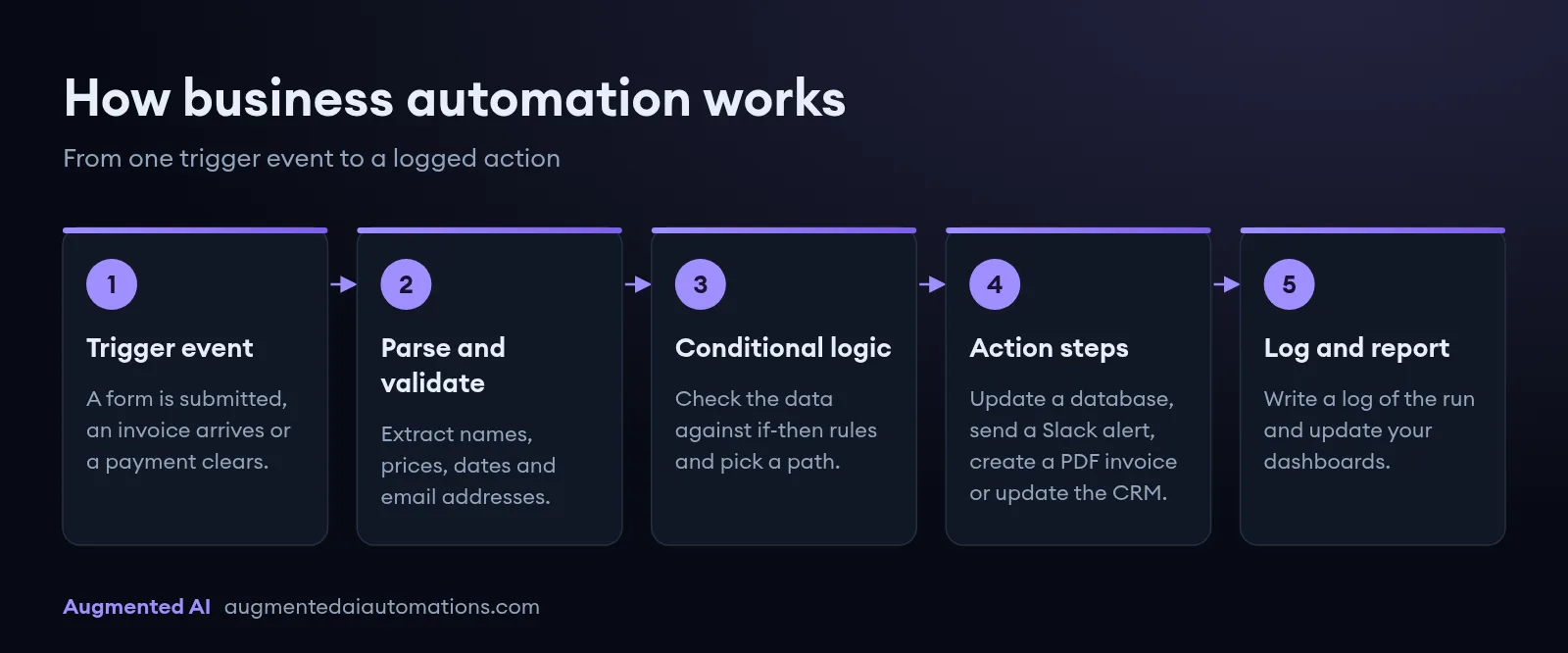
Business automation works by establishing digital connections between software applications through APIs, triggers, and logical rules. When a specific event occurs within one software system, the automation engine instantly captures that data, processes it according to preset rules, and executes actions in another system. This structured process eliminates the need for human employees to copy, paste, and manually move information between different programs.
- Trigger Events: The automated workflow begins with a specific digital event, such as a customer submitting a contact form, an invoice arriving in an inbox, or a payment clearing.
- Data Parsing and Validation: The system extracts key information from the trigger event, organizing variables like names, prices, dates, and email addresses.
- Conditional Logic Execution: The platform evaluates the extracted data against pre-defined rules, choosing different operational paths based on if-then criteria.
- Action Steps: The software executes the final actions, which can include updating database rows, sending customized Slack notifications, generating PDF invoices, or updating CRM pipelines.
- Integration and Logging: The automation platform writes log files of the complete execution path, updating your primary dashboards to ensure transparent tracking.
Business Automation: Key Benefits
1. Significant Operational Cost Reductions
Deploying software integrations dramatically lowers operational costs by reducing the manual hours required to complete administrative tasks. Because automated processes run continuously without fatigue, companies save money on overtime, administrative errors, and paper-based infrastructure.
2. Drastic Increases in Employee Productivity
When employees do not have to spend hours on manual data entry, they can focus on high-value projects that drive business growth. This shift allows your staff to focus on strategic tasks like building client relationships, refining products, and optimizing customer support systems.
3. Complete Elimination of Costly Human Errors
Manual data transfer inevitably results in keystroke errors, incorrect data entry, and lost documents. Automated workflows copy and transfer information with perfect consistency, ensuring that your financial records, client databases, and supply chain logs remain accurate. This absolute precision prevents costly operational mistakes, such as sending incorrect billing statements or shipping the wrong items to clients.
4. Rapid and Frictionless Scalability
As a business grows, its transaction, order, and inquiry volumes increase exponentially. Traditional business models require hiring more administrative staff to handle this workload, which drastically increases operational overhead. Automation platforms manage scaling demands instantly, handling thousands of tasks simultaneously without any drop in speed or accuracy.
5. Accelerated Business Processing Speeds
Automated pipelines process complex tasks, calculations, and data transfers in milliseconds. Instead of waiting hours or days for a manager to manually approve an invoice, systems can route and approve documents instantly based on predefined budget limits. This speed ensures that your customers receive immediate responses, which drastically improves your brand’s market competitiveness.
6. Enhanced Data Centralization and Visibility
Siloed information makes it difficult for executives to make informed decisions. Automation platforms bridge the gap between legacy databases, modern cloud apps, and accounting software, consolidating metrics into central databases.
Business Automation vs Manual Processes
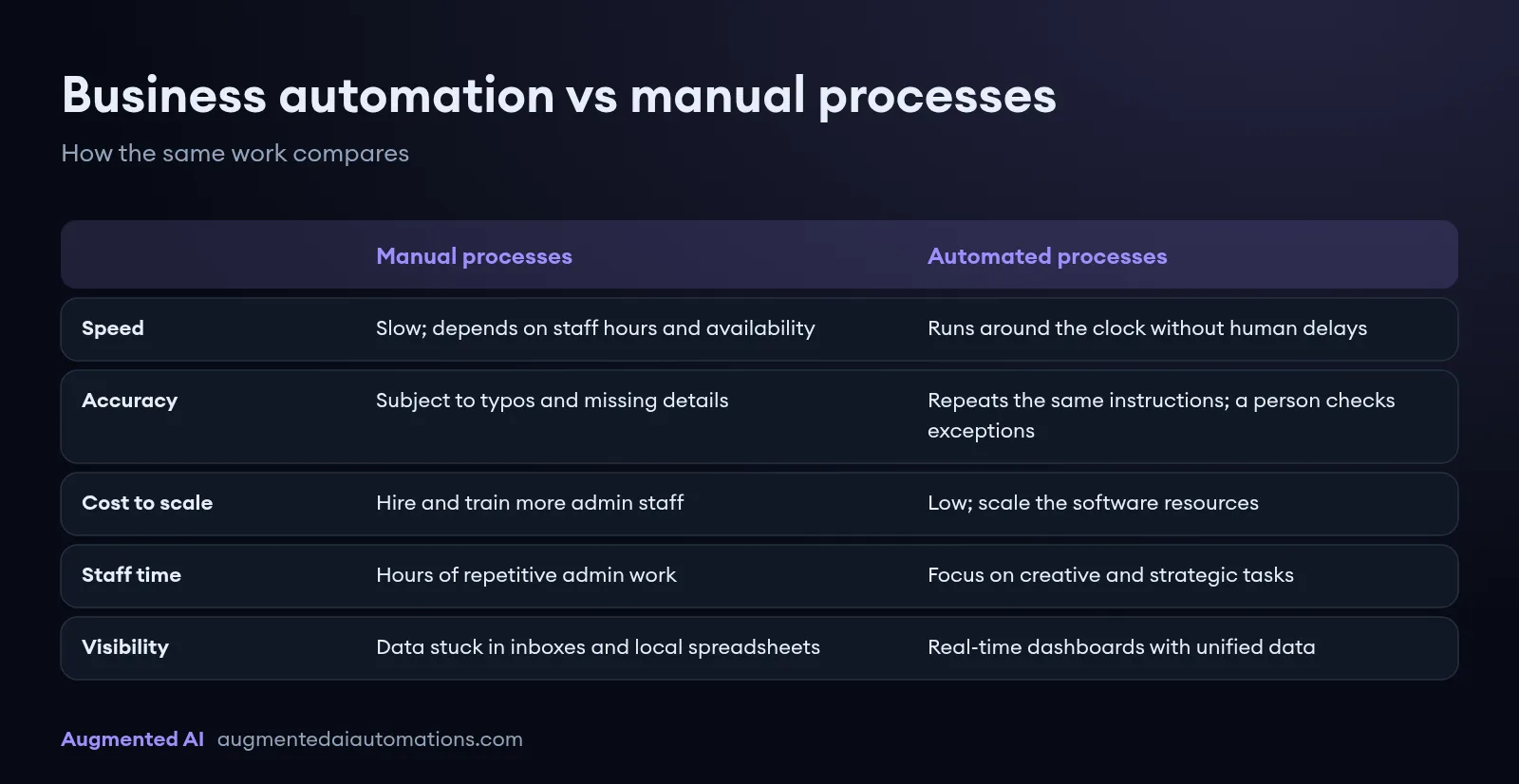
| Operational Metric | Manual Processes | Automated Processes |
|---|---|---|
| Processing Speed | Slow; dependent on staff working hours and availability. | Instantaneous; operates 24/7/365 without human delays. |
| Data Accuracy | Subject to human error, typos, and missing details. | Repeats the same instructions. A person still checks exceptions. |
| Scalability Cost | High; requires hiring and training more administrative staff. | Extremely low; system scales with software resource adjustments. |
| Resource Allocation | Staff spend hours on repetitive, demotivating admin work. | Staff focus on high-yield, creative, and strategic tasks. |
| System Visibility | Data is isolated in email inboxes and local spreadsheets. | Real-time dashboards pull unified data across APIs. |
How to Get Started with Business Automation
1. Identify and Document High-Frequency Bottlenecks
Begin by tracking the daily tasks of your administrative, sales, and operations teams to spot manual processes. Focus specifically on high-volume, predictable tasks like invoicing, leads routing, scheduling appointments, or uploading CSV spreadsheets. Creating process maps for these tasks helps clarify exactly where human bottlenecks and data delays occur in your company.
2. Clean and Standardize Your Operational Data
Automation systems require highly structured, predictable inputs to run smoothly and prevent workflow errors. Before setting up integrations, clean up your client databases, unify your naming conventions, and format your spreadsheets. Removing duplicate files and updating customer fields ensures your automated rules run without interruption.
3. Establish Measurable Automation Goals
Set clear key performance indicators (KPIs) for your automation projects. These targets could include reducing client onboarding times from two days to ten minutes, or cutting weekly billing admin hours by 85%. Defining clear targets allows you to measure your exact return on investment (ROI) after deploying your integration tools.
4. Choose Your Business Automation Tech Stack
Select software platforms that align with your team's budget, technical expertise, and scaling requirements. For simple workflows, cloud integration platforms like Zapier offer powerful visual builders to connect software applications. For legacy enterprise software lacking modern APIs, choose robust Robotic Process Automation (RPA) tools like UiPath or custom script solutions.
5. Build and Deploy a Pilot Project
Avoid trying to automate your entire business operation overnight, as this often leads to system conflicts. Start by building a single, high-impact workflow, such as automatically sending leads from your website to your sales team's WhatsApp accounts. This pilot project lets you test trigger-action mechanics, gather user feedback, and fix bugs before launching wider integrations.
6. Partner with a Specialized Automation Agency
Working with professional developers helps you avoid common integration mistakes and reduces setup times. Partnering with a business automation agency like Augmented AI means the system is built to fit your current IT setup. Specialist developers can build custom API integrations and complex logic pathways that standard drag-and-drop tools cannot support.
7. Train Employees and Refine Internal Workflows
Prepare your staff for the digital transition by showing them how to use and monitor the new automated tools. Emphasize that these software updates are designed to eliminate their most tedious, frustrating tasks rather than replace their jobs. Providing training documentation and video tutorials ensures your team feels confident working alongside automated systems.
8. Continuously Monitor and Optimize Workflows
Treat your business automation infrastructure as an ongoing project that evolves alongside your company. Set up error-reporting tools to alert your IT team if an API connection goes down or a data input fails. Regularly review your integration logs, analyze system performance, and tweak automated triggers to keep operations running as efficiently as possible.
Frequently Asked Questions
What industries benefit the most from business automation?
While every industry can benefit, sectors like financial services, e-commerce, real estate, logistics, and legal firms see the fastest returns on investment. These sectors process large volumes of paperwork, invoice calculations, and lead communications, making them ideal for automated workflows.
Is business automation only suitable for large enterprises?
No, small and medium enterprises (SMEs) can highly benefit from automation because it allows small teams to compete with much larger organizations. By using software to automate administrative work, small businesses can scale operations rapidly without the major overhead costs of hiring new employees.
What is the difference between RPA and API-based automation?
Robotic Process Automation (RPA) uses software bots to mimic human actions on a screen, like clicking buttons and copying data from older software programs. API-based automation connects software systems directly at the database level, allowing for much faster, more secure, and highly stable data transfers.
Will business automation replace human workers?
Automation processes do not eliminate employees; instead, they change the daily responsibilities of your workforce. By taking over repetitive, low-value administrative tasks, the technology allows your team to focus on strategic initiatives, complex problem-solving, and building better client relationships.
How long does it take to see a return on investment from automation?
Most companies see significant time savings and reduced error rates within the first month of launching their pilot automation workflows. The complete financial return on investment is typically reached within three to six months, depending on the complexity of your custom software integrations.
What Is Automation in Business?
Automation in business means using software, AI, and connected workflows to handle recurring operational tasks without manual intervention. Whether you run an e-commerce store, agency, or corporate team, automation in business covers lead routing, invoice processing, email marketing and automation, and CRM updates, all running on rules you define once.
Business Automation vs Business Process Automation
Business automation is the broad practice of using technology to reduce manual work across your company. Business process automation (BPA) is the structured subset that maps and automates entire multi-step workflows, like client onboarding from contract signing through billing setup. Most growing companies start with single-task automation, then graduate to BPA as operations scale.
When you need expert implementation, read what an AI automation agency does.
Related Resources
- Email Marketing and Automation Guide
- AI Automation Agency: What It Does and How to Choose One
- Work with our AI automation agency
Summary
Business automation shifts tedious, repetitive admin tasks from human workers to intelligent software platforms, boosting operational efficiency. Implementing integrated workflows reduces operational costs, eliminates manual data entry mistakes, and enables businesses to scale without hiring more administrative staff. Working with an experienced agency like Augmented AI ensures a smooth, secure transition to automated systems, keeping your enterprise competitive in today's digital market.
What does business automation look like in South Africa?
The definition above is general. The local version is a task a team in this country already does by hand.
Boards and More took handwritten cutting lists and put them into the CRM without the retype. Momentum took forms that staff were keying and moved that data entry off the critical path, so people review exceptions.
Those are the same pattern. A document or a message arrives. A person used to copy it. The system copies the reliable fields. The person keeps the odd case.
If you want that scoped for your own process, start with AI automation in South Africa or the business process automation consultant page. The work is the process you can time, not a new slogan.