
Software by Augmented AI Automations
InstaCutList: cut list software that turns handwritten lists into optimiser-ready cut lists
InstaCutList is cut list software from Augmented AI Automations for South African board cutting, edging and cabinet shops. You photograph a customer's handwritten cutting list. The app turns it into a clean digital cut list. Your team reviews it, then exports it to the cutting optimiser you already run.
Every shop starts with a free 14-day trial. Starter is R2,200 per month for 100 scans. Growth is R3,500 per month for 500 scans. Pro is R5,500 per month for 1,000 scans. Payment is month to month through a secure Paystack payment link. There is no long-term contract, and you can cancel any time.
To start your trial or choose a plan, email rkanjee@augmentedaiautomations.com or book a call. There is no self-serve signup. We set up your shop with its own private login.
The problem with handwritten cutting lists
I have been on the floor of board cutting shops where the day still starts with paper. A customer walks in with a cutting list on a clipboard, or sends a WhatsApp photo, or drops a rough Excel sheet. Someone then retypes every length, width, quantity, board type and edging note into the cutting optimiser before a quote or a cut can move.
That queue is slow. It is also where mistakes land. Misread a six for an eight and you can scrap a whole board.
At Boards and More, a South African cutting and edging shop we worked with on site, entering cutting lists was eating the day. Small orders took about 10 to 15 minutes. Bigger ones could take up to an hour. On a busy day that work stacked up around five times, and it added up to hours that never reached sales or the saw.
If you already run OptiPlan, MaxCut, CutList Plus fx or similar, you do not need another nesting tool first. You need the list to arrive in that tool without a full retype.
How InstaCutList works
Here is the flow I built after watching how lists actually arrive at the counter.
1. Capture the list
Staff photograph the handwritten cutting list, or upload a PDF, Excel file, CSV or pasted message.
2. Extract the lines
InstaCutList reads quantities, lengths, widths, board types and edging, and builds a digital cut list. Board, edging and groove names map to your own shop catalogue.
3. Review side by side
The original photo sits next to the extracted lines. Staff check and correct any line before it goes to the saw. This is deliberate. Handwriting is messy, and a 30-second review is cheaper than a wrong cut.
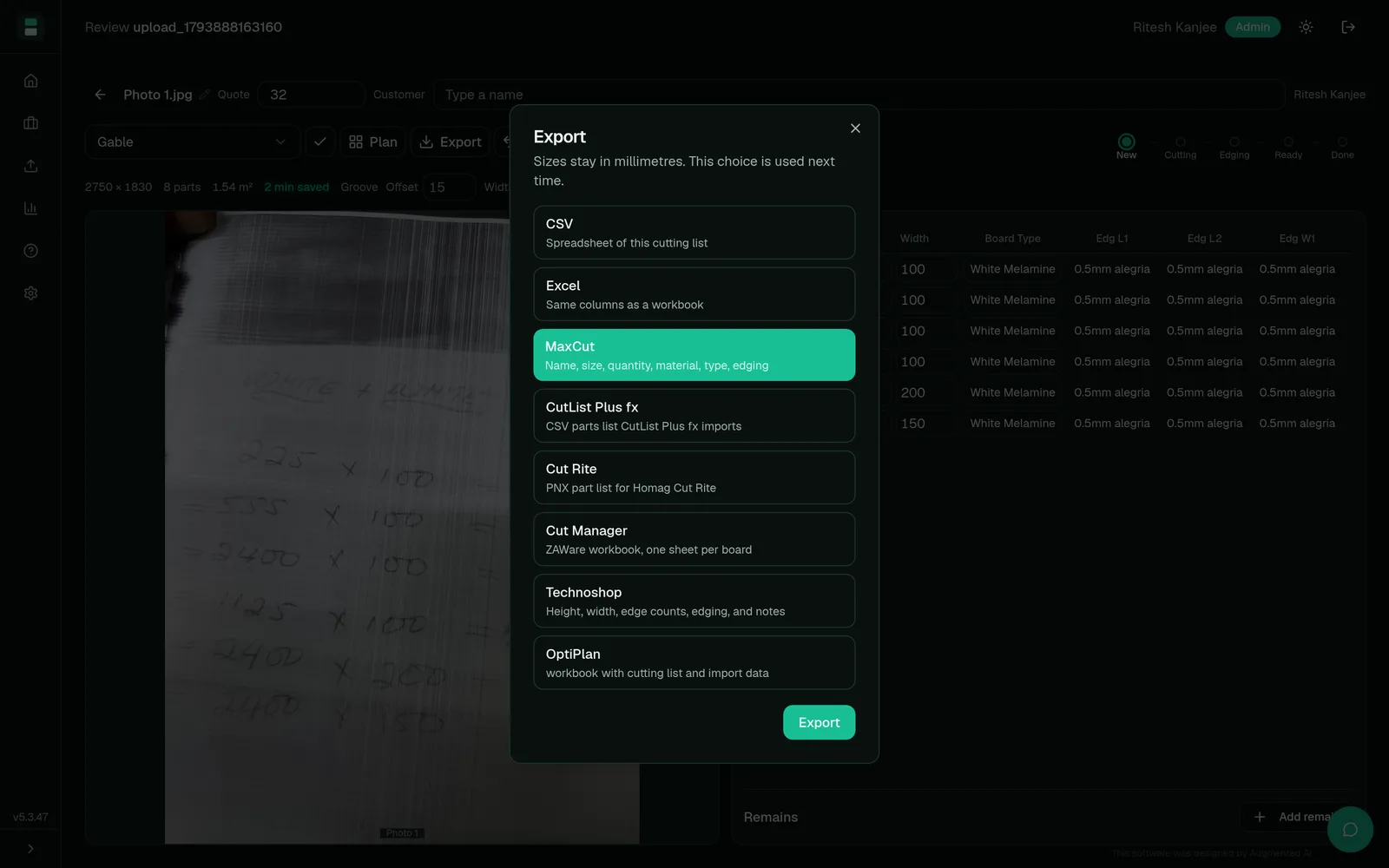
4. Export to your optimiser
Export in the format your shop already uses: OptiPlan, MaxCut, CutList Plus fx, Cut Rite (PNX), Cut Manager, Technoshop, Excel or CSV. Nobody has to retype the list.
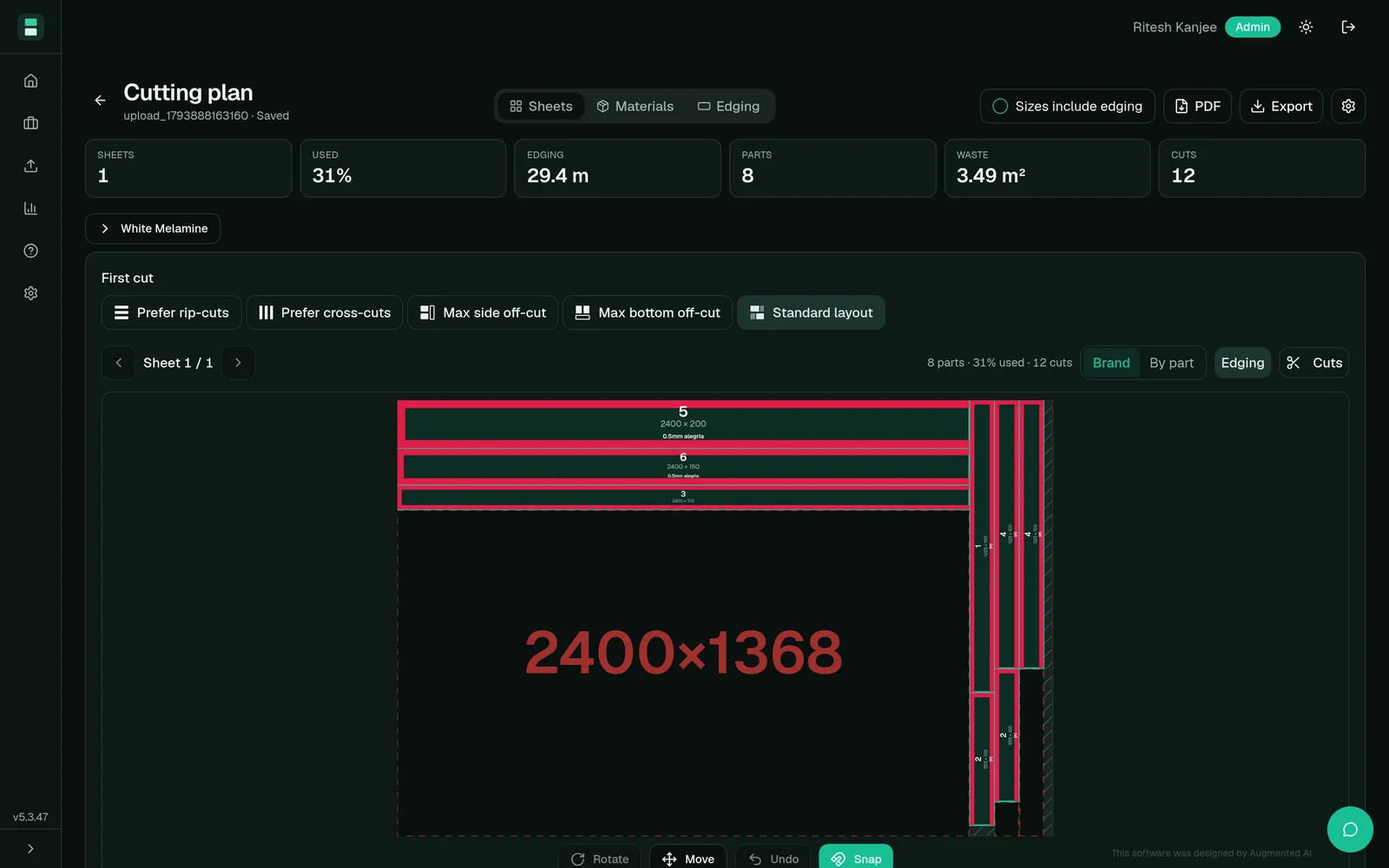
5. Optional built-in cutting plan
See a sheet layout with parts, waste, edging metres and cut count, and download it as a PDF for the workshop when you want that view in-app.
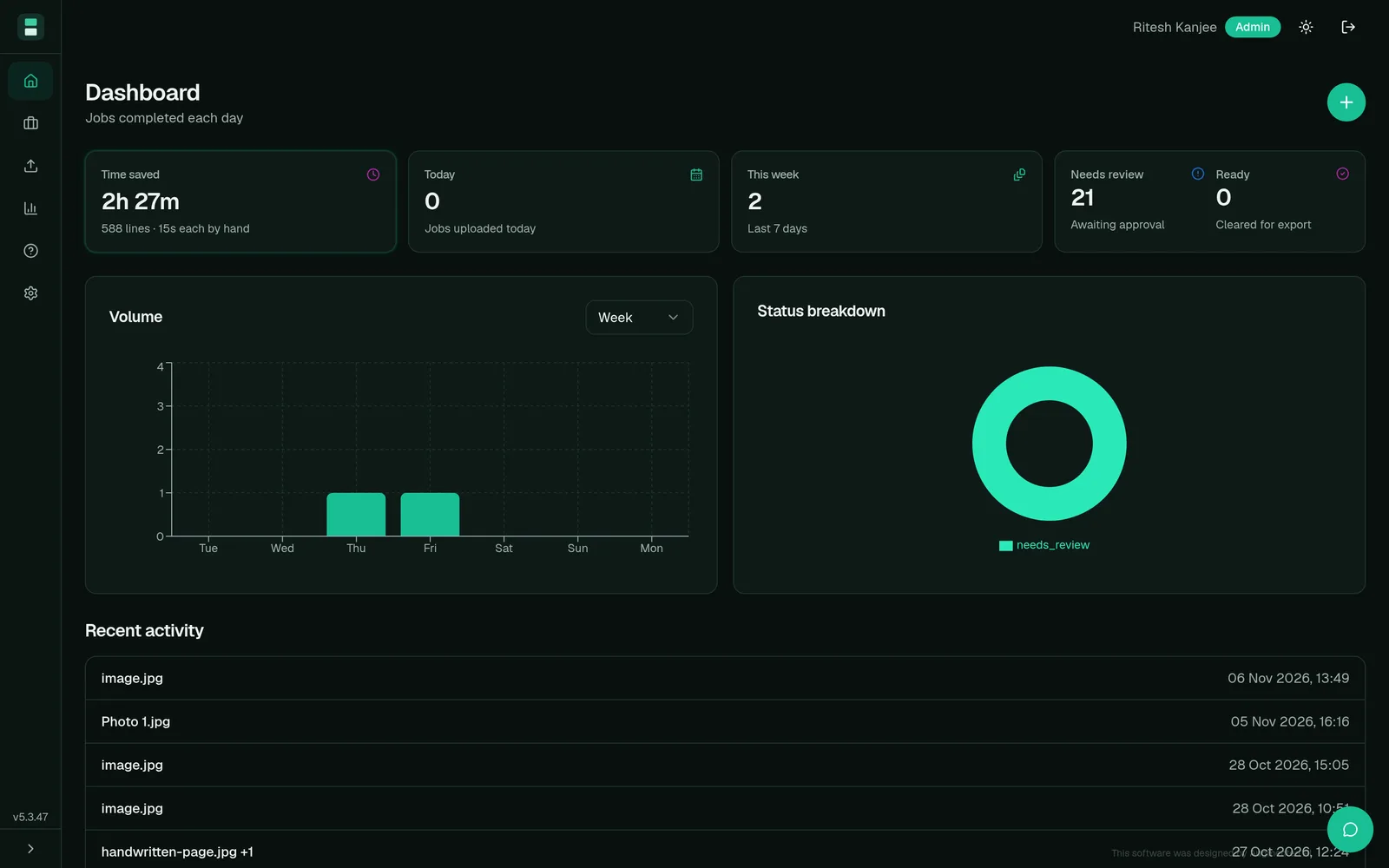
6. Track usage
The dashboard tracks jobs per day, lines processed, time saved and scans used against your monthly allowance. Every shop gets its own private login.
On site with a board cutting shop
I did not design InstaCutList from a slide deck. I went to Boards and More, walked the factory, and sat with the team while they typed lists into MaxCut one line at a time.
The video at the top of this page is that visit: how a handwritten list reaches the optimiser, where the time goes, and what changes when you upload a photo instead of rekeying every row.
Video: Can I scale this stuck board-cutting business?
In the video, the shop owner walks through the old way: enlarge the photo, print it, then type into MaxCut with a ruler on the paper. The new way is upload, review, and export. He describes getting a day of that work down to about an hour, and wanting the spare time for customers, sales and advertising.
InstaCutList is the productised version of that photo-to-cut-list pattern. For the custom CRM story behind the same shop, see our workshop cutting list case study and the Boards and More write-up.
Features
Photo to cut list in seconds
Photograph the list or upload a PDF, Excel, CSV or pasted message. InstaCutList builds the cut list for you.
Side-by-side review
Original photo beside extracted lines, so corrections happen before the saw.
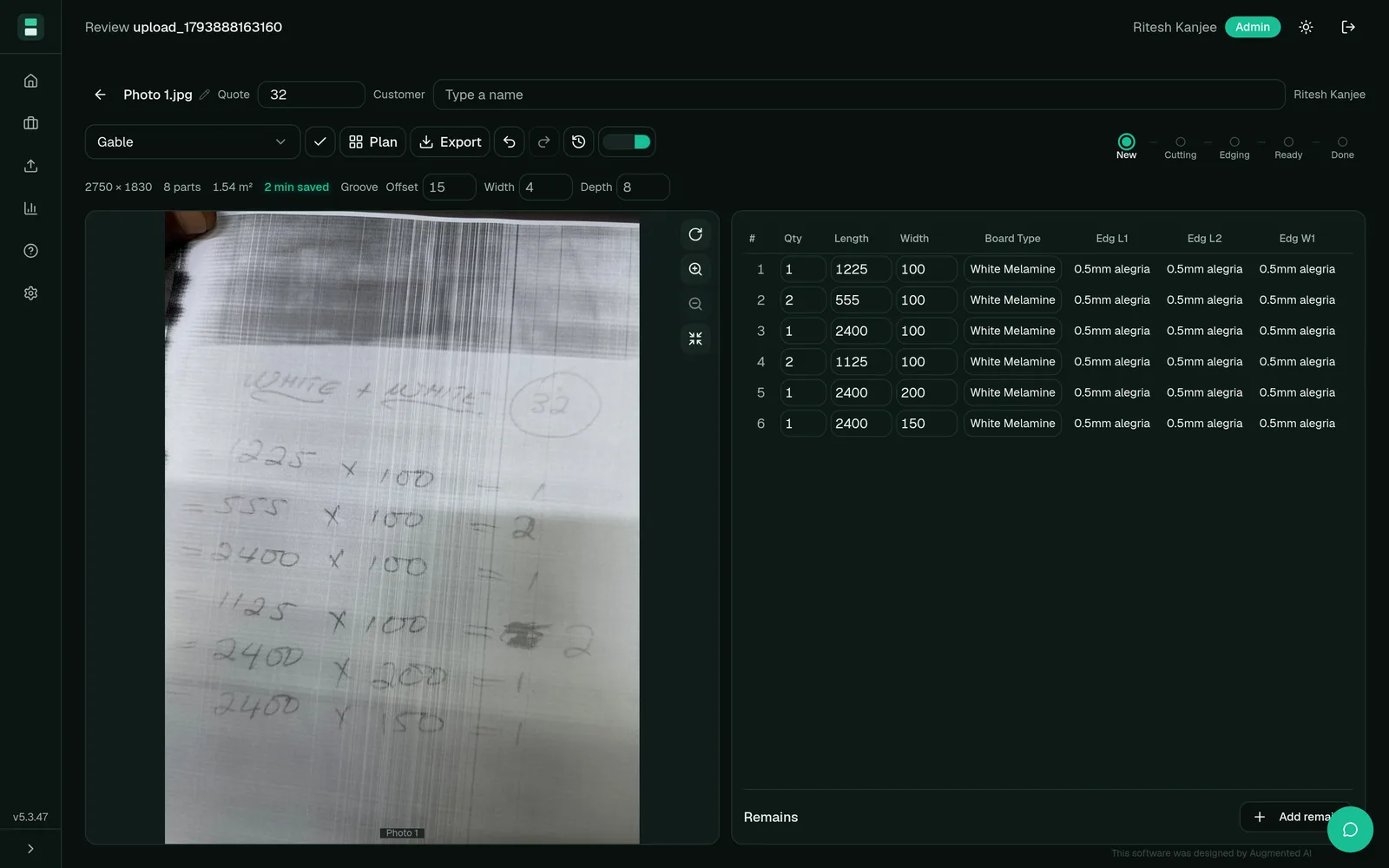
Shop catalogue mapping
Board, edging and groove names map to your catalogue, not a generic template.
Export to the tools you already use
OptiPlan, MaxCut, CutList Plus fx, Cut Rite (PNX), Cut Manager, Technoshop, Excel or CSV.
Built-in cutting plan PDF
Sheet layout, waste, edging metres and cut count when you want it in-app.
Dashboard and private shop login
Jobs, lines, time saved and scan allowance on a private login per shop.
Screenshots from the live InstaCutList app, using our internal demo shop.
InstaCutList is cut list software and a cutting list app for the capture step. It includes a built-in cutting plan, and it exports into your cutting list optimiser. It does not ask you to throw away MaxCut, OptiPlan or CutList Plus fx.
Pricing
Prices are in South African rand. Every shop starts with a free 14-day trial on real jobs. After the trial, pick a monthly plan based on how many cutting lists you scan. Payment is month to month through a secure Paystack payment link. No long-term contract. Cancel any time.
| Plan | Price | Scans |
|---|---|---|
| InstaCutList Starter | R2,200 / month | 100 scans a month |
| InstaCutList Growth (most popular) | R3,500 / month | 500 scans a month |
| InstaCutList Pro | R5,500 / month | 1,000 scans a month |
How payment works
- Contact us to start the free 14-day trial. We set up your shop login.
- Choose a plan that matches your monthly scan volume.
- We send you a secure Paystack payment link for that plan.
- Your plan renews each month until you cancel.
To get access, email rkanjee@augmentedaiautomations.com or book a call.
Frequently asked questions
What is InstaCutList?
InstaCutList is cut list software from Augmented AI Automations for board cutting and edging shops in South Africa. It turns photos of handwritten cutting lists (or PDF, Excel, CSV and pasted lists) into digital cut lists ready for your cutting optimiser.
Is InstaCutList a cutting list optimiser?
It includes a built-in cutting plan with sheet layout, waste, edging metres and cut count. Its main job is to stop retyping: capture the list, review it, then export to OptiPlan, MaxCut, CutList Plus fx, Cut Rite (PNX), Cut Manager, Technoshop, Excel or CSV.
Who is InstaCutList for?
Cut-and-edge shops, board cutting workshops and cabinet shops that still receive handwritten or messy digital cutting lists and need them in the optimiser without rekeying.
How much does InstaCutList cost?
Every shop starts with a free 14-day trial. Starter is R2,200 per month for 100 scans. Growth is R3,500 per month for 500 scans. Pro is R5,500 per month for 1,000 scans. Payment is month to month through Paystack, with no long-term contract.
Does it work with South African board sizes and catalogues?
Yes. Board, edging and groove names map to your own shop catalogue. Exports match the tools SA shops already use. Payment is in rand through Paystack.
How do I start?
There is no self-serve signup yet. Email rkanjee@augmentedaiautomations.com or book a call at https://calendar.app.google/aGMfS4TL6DjoyBWz7. We set up your shop login and you run real jobs for 14 days at no cost.
Get access
If your shop is still retyping cutting lists, start the free 14-day trial. Growth is R3,500 per month for 500 scans, billed through Paystack when you are ready.
Email rkanjee@augmentedaiautomations.com or book a call.
Built by Augmented AI Automations in Pretoria for SA board shops.