Last updated: 27 October 2026. Written by Ritesh Kanjee, director of Augmented AI Automations.
Debtors management is the work of invoicing customers, tracking what each one owes and collecting it on time. To automate it, pull your aged debtors list daily, send reminders on a fixed schedule around the due date, log every promise to pay, and pass only disputes and long-overdue accounts to a person.
This guide is for owners, bookkeepers and credit controllers at South African businesses who still chase payments by hand. It comes from the finance and document workflows we build at Augmented AI Automations, where one rule keeps holding: software should do the routine follow-up, and a person should handle the conversations that need judgement.
Why does manual debtors management cost South African businesses so much?
Manual collections cost time and cash at the same moment. In Xero's 2026 survey of 427 South African small businesses, 42% said they struggle with late payments. Of those, 46% spend up to four hours a week chasing them and another 46% spend between four and ten hours (Xero, 2026 State of Small Business Report, South Africa, fieldwork January to February 2026).
The cash side is just as heavy. A 2026 survey by the collections firm Kredcor puts the average days sales outstanding for South African commercial businesses at 63 days against standard 30-day terms, and at 74 days for micro businesses under R5 million turnover (Kredcor, The State of Commercial Debt 2026, May 2026). Treat a collector's survey with some care, but the pattern is clear: the money is earned, and it simply arrives about a month late.
Most of that delay is not deliberate. Invoices go to the wrong contact, statements are sent when someone has a free afternoon, and follow-ups stop when the bookkeeper is on leave. Those are process gaps, and process gaps are what automation fixes well.
Which parts of debtors management can you automate?
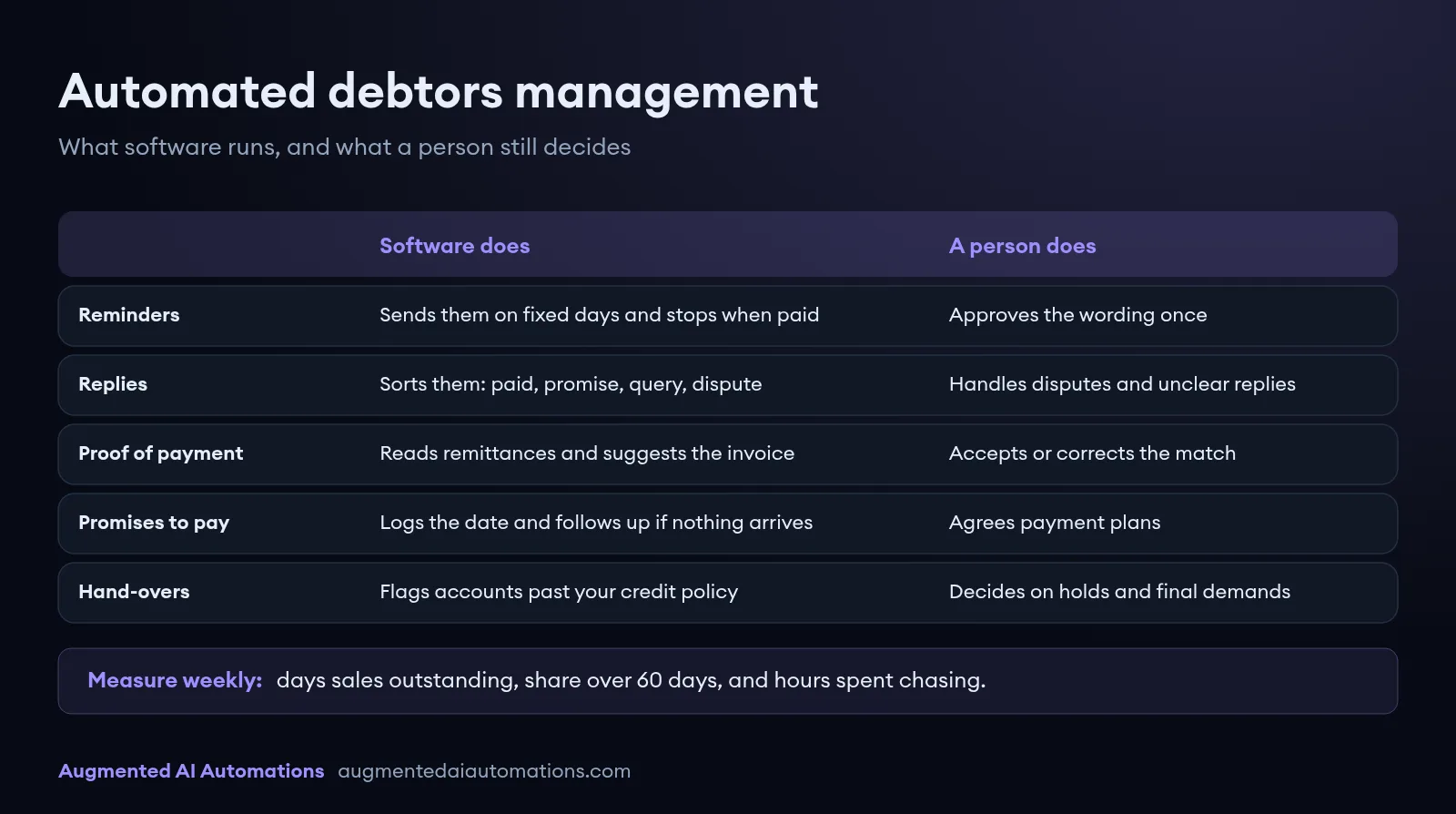
You can automate almost everything that repeats on a schedule, and very little of what needs a relationship. The table below shows how to split the work between software and your team.
| Task | What automation does | What a person still does |
|---|---|---|
| Invoices and statements | Sends them on time to the right billing contact, with a payment link | Fixes contact details when an email bounces |
| Payment reminders | Sends polite, then firmer reminders on fixed days, and stops when the invoice is paid | Writes and approves the wording once |
| Customer replies | Reads each reply and sorts it: paid, promise to pay, query, dispute or wrong contact | Handles disputes and anything the system is unsure about |
| Proof of payment | Reads remittances and proofs of payment and suggests the matching invoice | Accepts or corrects the match |
| Promises to pay | Logs the promised date and follows up the day after if nothing arrives | Agrees payment plans |
| Account holds and hand-overs | Flags accounts that hit your credit policy limits | Decides on holds, final demands and hand-over to an attorney or collector |
| Reporting | Updates the aged debtors view and the weekly numbers | Reviews them and acts on the worst accounts |
What does an automated payment reminder schedule look like?
A good schedule starts before the due date and gets firmer in small steps. The aim is to catch the honest slips early, so that only the accounts that really need attention reach a person. Use the schedule below as a starting point, then adjust it to your terms and your customers.
| When | Message | Channel |
|---|---|---|
| 3 days before due | Friendly heads-up with the invoice and payment link | |
| Due date | Payment due today, with banking details and a copy of the invoice | |
| 3 days overdue | Short reminder asking whether the invoice was received | Email or WhatsApp |
| 7 days overdue | Statement of account and a request for a payment date | Email, plus a call task for your team |
| 14 days overdue | Firmer reminder that refers to your credit terms | |
| 30 days overdue | Notice that the account may be placed on hold | Email and a call from a person |
| Past your policy limit | A person decides on a final demand or hand-over | Letter, reviewed before it is sent |
If you use a cloud accounting package, check its built-in tools first. Xero, for example, can email reminders before and after the due date and stops once payment is matched to the invoice (Xero Central, Get your invoices paid faster, checked 27 October 2026). For a small customer list with simple terms, that may be all you need.
How do you automate collections step by step?
Build it in the same order every time: clean data first, then the schedule, then the reply handling. Skipping the first step is the most common reason reminders go to the wrong person and customers get annoyed.
- Clean your debtor data: confirm a billing contact, a statement email and payment terms for every active customer.
- Connect the source of truth: pull open invoices and the aged debtors list from your accounting system every day, through its API where it has one.
- Write the templates once: one message per step, with the customer name, invoice number, amount, due date and payment link filled in automatically.
- Set the stop rules: stop when an invoice is paid, pause when a customer raises a query, and leave key accounts to a named person.
- Handle replies: route every reply into one queue, where AI sorts it and drafts a response for a person to approve.
- Add an exception queue: anything uncertain, such as a partial payment or an unknown sender, goes to a person with the context attached.
- Measure weekly: track the numbers in the last section of this guide from the first week, so you can see whether it works.
Where does AI help, and where should a person stay in charge?
AI helps most where someone used to read something before acting. Customer replies, remittance advices and proofs of payment arrive as free text, PDFs and phone photos, and that reading work is what fixed rules cannot do. A plain reminder tool sends emails, but it cannot tell you that the invoice went to the wrong department or that the customer promised to pay on Friday.
We use the same pattern here that we use in our document projects. At Momentum, staff were reading scanned forms and typing the data into legacy systems by hand. We built a pipeline that captures each document, extracts the data with AI, validates it against existing records and writes it back, so operations staff now handle only the exceptions (Momentum case study). In collections the documents are remittances and replies instead of forms, but the capture, extract, validate and review steps are the same.
A person should stay in charge of anything that affects the relationship or carries legal weight. That includes disputes, payment plans, account holds, final demands and the decision to hand an account over. The system can prepare the paperwork for each of these steps, but a person reads it and approves it before anything goes out.
What legal points should South African businesses check?
Two legal points affect how you design a collections workflow in South Africa. This is general information, not legal advice, so confirm the details with your attorney before you change your credit policy.
- Prescription: under the Prescription Act, most ordinary debts prescribe after three years from the date they are due. The clock is interrupted by an acknowledgement of the debt, such as a part payment, or by service of a summons (Prescription Act 68 of 1969, sections 11, 12, 14 and 15, checked 27 October 2026). A reminder email alone does not stop the clock, so your system should flag old accounts well before the three years run out.
- Who may collect: anyone who collects debts on behalf of someone else for reward must be registered with the Council for Debt Collectors, unless they are an attorney (Debt Collectors Act 114 of 1998, sections 1 and 8, checked 27 October 2026). Chasing your own invoices with your own staff and systems is different from handing accounts to an outside collector, so check the registration of any collector you appoint.
Keep a full record of every reminder, reply and promise to pay. If an account does end up with an attorney, a clean timeline saves time and makes the next step easier to justify.
How do you measure whether automated debtors management is working?
Measure days sales outstanding and the share of your book that is badly overdue, every week. Days sales outstanding is your debtors balance divided by credit sales for the period, multiplied by the number of days in that period. If it falls and the share over 60 days shrinks, the workflow is doing its job.
| Metric | How to calculate it | What good looks like |
|---|---|---|
| Days sales outstanding | (Debtors balance / credit sales for the period) x days in the period | Moving towards your payment terms |
| Share over 60 days | Debtors older than 60 days / total debtors | Falling month on month |
| Hours spent chasing | Staff time on reminders and calls, logged for one week | Most of it spent on disputes and key accounts only |
| Promises kept | Promises to pay met on time / promises made | Rising, with broken promises followed up the next day |
Record a baseline in the week before you switch anything on. Without it, nobody can say whether the automation saved time or brought cash in faster, and that is the number that justifies the next build.
What to do next
Export your aged debtors report today, mark the ten largest overdue accounts, and log how long your team spends chasing payments this week. That gives you the baseline and shows whether built-in reminders are enough or whether you need reply handling and payment matching as well. For related workflows, read how to automate invoice processing, our guide to accounts payable automation, and nine practice tasks accountants can automate.
If you want collections scoped for your business, see how we deliver AI automation in South Africa and book a call with Augmented AI Automations.