Last updated: 27 October 2026. Written by Ritesh Kanjee, director of Augmented AI Automations.
RPA (robotic process automation) is software that repeats fixed, rule-based steps, like a person clicking through the same screens. AI automation adds models that read documents, emails and messy inputs and make judgement calls. Use RPA when the input is structured and the steps never change. Use AI automation when the input varies. Most real workflows need both.
This guide is for operations, finance and admin managers who have been pitched both and want to know which one fits their process. It comes from the document and data-entry systems we build at Augmented AI Automations in South Africa, including forms processing for Momentum, where the honest answer was rarely one or the other.
What is the difference between RPA and AI automation?
RPA follows instructions exactly, while AI automation interprets what it is looking at. IBM describes RPA as rule-based software that uses scripts to imitate human steps, such as extracting data, filling in forms and moving files. It describes AI as adding the "thinking" on top of that "doing" (IBM, What is RPA?, checked 27 October 2026).
In practice the difference shows up in the input. An RPA bot is reliable when every record arrives in the same fields on the same screen. An AI model is useful when the same information arrives as a scanned form, a PDF with a different layout, or a client email written in their own words.
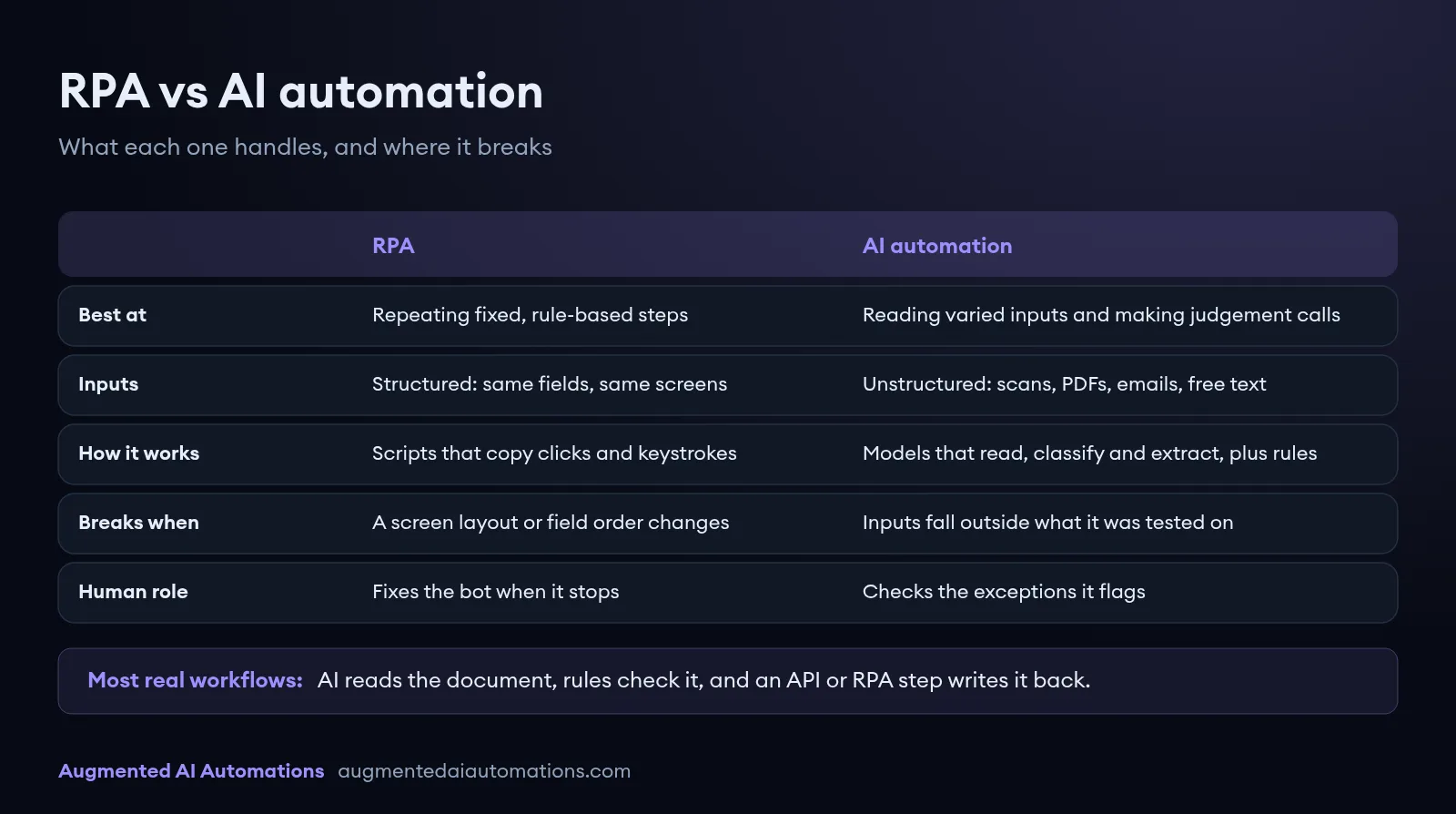
| RPA | AI automation | |
|---|---|---|
| Best at | Repeating fixed, rule-based steps | Reading varied inputs and making judgement calls |
| Inputs | Structured: same fields, same screens | Unstructured: scans, PDFs, emails, free text |
| How it works | Scripts that copy clicks and keystrokes, or call an API | Models that read, classify and extract, combined with business rules |
| Breaks when | A screen layout or field order changes | Inputs fall outside what it was tested on |
| Human role | Fixes the bot when it stops | Checks the exceptions it flags |
| Typical tools | UiPath, Microsoft Power Automate desktop flows, custom scripts | Language and vision models inside a custom pipeline |
When is RPA the right choice?
RPA is the right choice when the task is high volume, the rules fit on one page, and the input is already structured. If a person could write the steps as a checklist and never need to make a judgement, a bot can usually follow that checklist faster and without typos.
It is also useful when an old system has no API. A bot can log in and type into the screen the same way a staff member does, which is often the only way to automate a legacy package without replacing it. Signs that RPA alone will do the job:
- The data already sits in a system or a spreadsheet with fixed columns.
- The steps are the same for every record, with no reading or interpretation.
- The screens it works on rarely change.
- Exceptions are rare and easy to spot, such as a missing field.
When do you need AI automation instead?
You need AI automation when someone has to read something before they can act on it. Scanned forms, supplier invoices, bank statements, contracts and inbound emails all fall into this group. A fixed script cannot tell where the right value sits on a page it has never seen.
We have seen classic OCR and template tools hit the same wall. On our Aussizz Group project, standard OCR tools could not cope with unstructured layouts and poor-quality scans, so we built specialised AI agents that each check one document type (full case study). Signs that you need AI in the workflow:
- The same information arrives in many formats or from many senders.
- Staff read, classify or summarise documents before they type anything.
- Decisions depend on context, such as whether a document is complete or a request is urgent.
- Your current automation fails every time a supplier changes their template.
Can RPA and AI automation work together?
Yes, and in most document-heavy processes they should. AI handles the reading, rules handle the checking, and an API or an RPA step handles the typing into the system of record. IBM calls this combination intelligent automation (IBM, What is intelligent automation?, checked 27 October 2026).
The pattern we use on most data-entry projects has four stages, with a person in the loop for anything the system is unsure about:
- Capture: collect documents from email inboxes, portals or shared drives.
- Extract: an AI model reads each document and pulls out the fields that matter.
- Validate: business rules cross-check the values against existing records.
- Write back: clean records go into the target system through an API, or through an RPA step where no API exists. Anything that fails a check goes to a person.
What have we seen in real projects?
In our own projects the screen-clicking part has usually been the smallest piece of the work, and reading the documents has been the hard part. That is why we rarely recommend RPA on its own for document work.
At Momentum, staff in several departments were reading scanned forms and typing the data into legacy databases by hand. We built a pipeline that captures each document, extracts the data with AI, validates it and writes it back, so operations specialists now handle only the exceptions (Momentum case study). At Aussizz Group, replacing one generalist AI agent with a set of specialised agents cut review time per visa file from eight hours to four.
A freight client of ours had a similar problem with mixed paper scans. Bills of lading, customs releases and invoices arrived merged in single PDFs, so the system first splits and classifies the pages, then extracts and validates the data before submitting it to the customs system. A pure RPA bot could have done the final submission, but not the sorting and reading that came before it.
How do you decide which one your process needs?
Start with the input, not the tool. Pick one process, look at 20 real examples of what arrives, and answer these questions honestly:
- Does every record arrive in the same structure? If yes, RPA or a simple integration may be enough.
- Does someone read or interpret the input before acting? If yes, you need AI for that step.
- Does the target system have an API? If yes, use it. If not, an RPA step can type into the screen.
- How often do the screens or document layouts change? Frequent changes make pure RPA expensive to maintain.
- What happens when the system is unsure? Every design needs a clear exception queue that a person checks.
If you only answer yes to the first and third questions, start with rules and integrations. If the second question is a yes, plan for AI from the start, because bolting it onto an RPA bot later usually means rebuilding the flow.
What are the common mistakes when choosing between them?
The most common mistake is buying a tool before mapping the process. A licence for an RPA platform does not help if most of the effort is people reading PDFs, and an AI model does not help if the real problem is two systems that simply need connecting.
- Automating a broken process instead of simplifying it first.
- Using screen-clicking bots where an API already exists, which creates something fragile for no reason.
- Expecting AI to be right every time, with no validation rules or human review.
- Skipping the baseline, so nobody can say how much time the automation actually saved.
What to do next
Choose one process that eats the most staff hours, collect a sample of real inputs, and measure how long it takes today. That baseline tells you whether rules, RPA, AI or a mix will pay off. For more background, read what OCR software does, our guide to data entry automation, and how an AI automation agency scopes this work. Pricing depends on the process, and what AI automation costs in South Africa explains how it is quoted.
If you want a second opinion on which approach fits your process, see how we deliver AI automation in South Africa and book a call with Augmented AI Automations.