The Claude YouTube Team gives you 30 specialist AI agents — each with a detailed SOP, ready-to-use prompt templates, and full API/tool setup guides. Instead of using Claude to write video titles, you can turn it into a full YouTube growth team that handles strategy, scripting, production, distribution, engagement, and monetization.
What is inside the 30 Claude YouTube Agents pack?
The pack is designed for YouTube creators and business owners who want to run a professional, high-output channel without hiring a full production team. Each agent handles one job, which makes the system easier to run, improve, and delegate inside Claude Code or OpenClaw.
- Strategy and research agents for channel architecture, niche analysis, viral topic ideation, keyword research, title/thumbnail concepts, and audience avatars
- Pre-production agents for hooks, full scripts, retention pacing, CTAs, and shot lists
- Production agents for metadata, thumbnail direction, editing briefs, audio design, and subtitles
- Distribution agents for publishing, YouTube Shorts, cross-platform repurposing, community posts, and newsletters
- Engagement agents for comment moderation, viewer sentiment, superfan identification, and collaboration outreach
- Monetization agents for lead funnels, sponsorship pitches, analytics interpretation, A/B testing, and revenue tracking
How are the 30 agents organized?
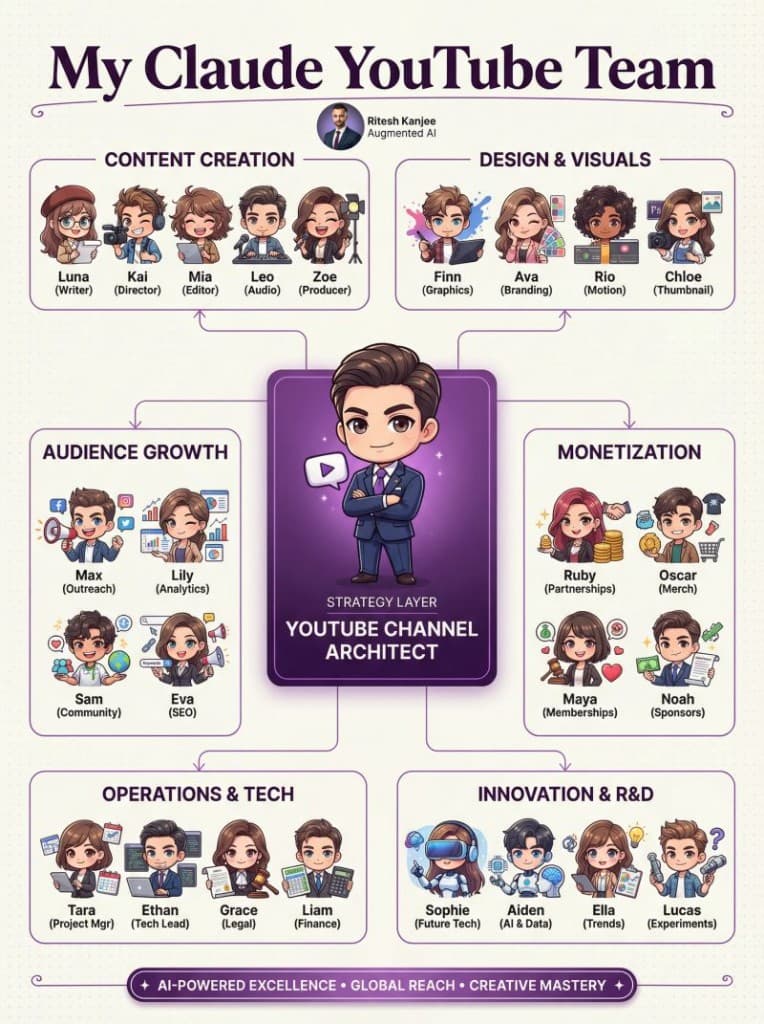
The system is grouped into six departments with a central orchestrator — the YouTube Channel Architect — that routes tasks across the whole workflow.
| Department | Agents | What it covers |
|---|---|---|
| A — Strategy | 01–06 | Channel strategy, niche analysis, viral topics, keywords, title/thumbnail concepts, audience avatars |
| B — Pre-Production | 07–11 | Hooks, full scripts, retention pacing, CTAs, shot lists and B-roll planning |
| C — Production | 12–16 | SEO descriptions, thumbnail briefs, editing direction, audio design, subtitles |
| D — Distribution | 17–21 | Publishing checklists, Shorts creation, cross-platform repurposing, community tab, newsletters |
| E — Engagement | 22–25 | Comment replies, viewer sentiment, superfan identification, collaboration outreach |
| F — Monetization | 26–30 | Lead funnels, sponsorship deals, analytics interpretation, A/B testing, revenue tracking |
All 30 agents at a glance
| # | Agent Name | Department | Primary Output |
|---|---|---|---|
| 01 | YouTube Channel Architect | Strategy | Channel strategy document |
| 02 | Niche & Competitor Analyst | Strategy | Competitor gap report |
| 03 | Viral Topic Ideation Engine | Strategy | Weekly video idea bank |
| 04 | Keyword & SEO Strategist | Strategy | Keyword research sheet |
| 05 | Title & Thumbnail Concept Generator | Strategy | Title/thumbnail brief |
| 06 | Audience Avatar Builder | Strategy | Viewer persona document |
| 07 | Hook & Intro Writer | Pre-Production | First 30-second script |
| 08 | Core Script & Storyboard Writer | Pre-Production | Full video script |
| 09 | Retention & Pacing Optimiser | Pre-Production | Edited script with pacing notes |
| 10 | Call-to-Action Strategist | Pre-Production | CTA copy for each video |
| 11 | Shot List & B-Roll Planner | Pre-Production | Shot list document |
| 12 | Metadata & Description Writer | Production | SEO description + tags |
| 13 | Thumbnail Design Director | Production | Thumbnail design brief |
| 14 | Video Editing Director | Production | Editing brief document |
| 15 | Audio & Sound Design Consultant | Production | Music & audio notes |
| 16 | Subtitle & Caption Optimiser | Production | SRT/VTT caption file |
| 17 | Upload & Publishing Coordinator | Distribution | Publishing checklist |
| 18 | YouTube Shorts Creator | Distribution | Shorts script + cut points |
| 19 | Cross-Platform Repurposing Agent | Distribution | Multi-platform content pack |
| 20 | Community Tab Strategist | Distribution | Community post calendar |
| 21 | Newsletter Integration Specialist | Distribution | Email newsletter copy |
| 22 | Comment Moderation & Reply Engine | Engagement | Comment reply drafts |
| 23 | Viewer Sentiment Analyst | Engagement | Sentiment report |
| 24 | Superfan Identification Agent | Engagement | Superfan list + outreach |
| 25 | Collaboration & Outreach Scout | Engagement | Collab pitch emails |
| 26 | Lead Generation & Funnel Architect | Monetization | Lead funnel blueprint |
| 27 | Sponsorship & Brand Deal Negotiator | Monetization | Media kit + pitch email |
| 28 | YouTube Analytics Interpreter | Monetization | Analytics insights report |
| 29 | A/B Testing Coordinator | Monetization | A/B test plan + results |
| 30 | Revenue & ROI Tracker | Monetization | Revenue dashboard |
Who is this YouTube AI team for?
This pack is for YouTube creators, educators, coaches, agency owners, and business operators who want a professional content pipeline without hiring a full production team. It is especially useful if you already have a channel but your workflow around scripting, SEO, distribution, and growth still feels inconsistent or manual.
How do you install these agents into Claude Code?
- Step 1: Download the pack from the Google Drive link and unzip it locally.
- Step 2: Each agent comes as its own SOP file. Keep them as individual Markdown files so Claude can reference one role at a time.
- Step 3: Add the agent files into your Claude Code project skills or prompt library folder.
- Step 4: Start with the YouTube Channel Architect (Agent 01) and 3–5 core agents that match your biggest bottleneck — scripting, SEO, thumbnails, or distribution.
- Step 5: Run agents in sequence. For example: topic ideation → keyword research → script → thumbnail brief → metadata.
- Step 6: Save outputs and refine the prompts over time instead of rebuilding the workflow each session.
How do you install these agents into OpenClaw?
- Step 1: Download and unzip the pack.
- Step 2: Import each agent SOP into your OpenClaw skills or agent folder.
- Step 3: Assign the YouTube Channel Architect as the orchestrator to route tasks across the other specialists.
- Step 4: Group agents by department: strategy, pre-production, production, distribution, engagement, and monetization.
- Step 5: Build one workflow at a time. A good first workflow is topic ideation → script writing → SEO metadata → thumbnail brief → publishing checklist.
- Step 6: Keep it lightweight at first. You do not need all 30 agents on day one.
How to get started fast
The fastest way to get value is to identify your biggest bottleneck and start with that department:
- Struggling with ideas? Start with Department A — Strategy (Agents 01–06)
- Struggling with content quality? Start with Department B — Pre-Production (Agents 07–11)
- Struggling with growth? Start with Department F — Monetization (Agents 26–30)
Open the relevant agent SOP file and follow the Phase 1–3 workflow. Copy the prompt templates directly into Claude, ChatGPT, or your preferred AI tool.
Frequently asked questions
What are Claude YouTube agents?
Claude YouTube agents are specialist AI prompts with detailed SOPs designed to handle specific YouTube tasks. Instead of asking Claude to do everything, each agent has one clear job — like scripting, SEO, thumbnails, or analytics.
Can I use these agents without OpenClaw?
Yes. Each agent includes ready-to-use prompt templates you can paste directly into Claude Code, ChatGPT, or any AI tool. OpenClaw adds orchestration if you want persistent multi-agent workflows.
Do I need all 30 agents from day one?
No. Start with 3–5 agents that solve your immediate bottleneck. Most creators get the fastest wins from topic ideation, script writing, SEO metadata, and thumbnail briefs.
What tools and APIs do the agents need?
All 30 agents require Claude or ChatGPT as the core LLM. Some agents optionally use YouTube Data API, SerpAPI, Apify, AssemblyAI, or Canva API for enhanced capabilities, but these are not required to get started.
Is this free?
Yes. This resource is completely free to download and use.
Download the YouTube agent pack
Want more?
Summary
The 30 Claude YouTube Agents pack is a free YouTube growth system built around specialist roles instead of generic prompting. Each agent comes with a detailed SOP, prompt templates, and tool setup guides. If you want a structured way to handle strategy, scripting, production, distribution, engagement, and monetization on YouTube, this gives you a practical place to start.