Meet Your AI Automation Team is a 9 AI agent skills pack with detailed Standard Operating Procedures for each role in the Augmented AI Automation Team. These are practical workflows you can deploy inside Claude Code or as an OpenClaw agent setup to help run strategy, sales, marketing, content, operations, and reporting more systematically.
What is inside the AI Automation Team pack?
This pack contains 9 detailed SOP files, one for each agent in the Augmented AI Automation Team. Each SOP was built from frameworks used by top creators and AI automation operators, then structured for immediate business use rather than theory.
- 9 specialist agent SOPs covering executive, sales, marketing, content, and operations roles
- 4-phase workflows inside each file so execution stays clear and repeatable
- 3 ready-to-use prompt templates per agent for Claude Code or other LLM setups
- Tools and API tables showing what each workflow needs to run
- Troubleshooting guidance so the agents are easier to deploy inside real business pipelines
How is the team organized?
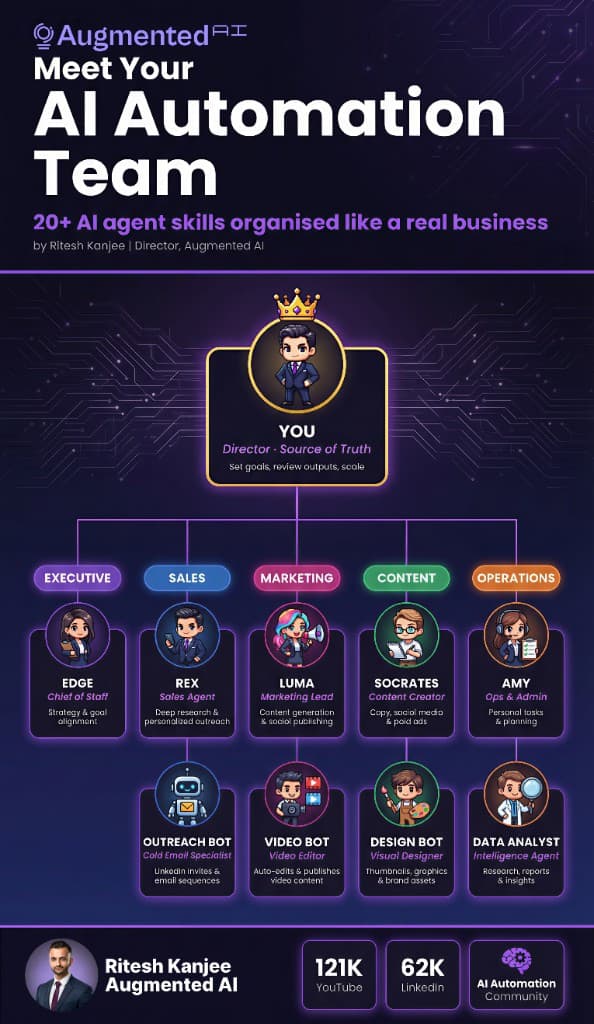
The pack is organized like a real business team. That makes it easier to decide which agent should own each job and how to connect them into a larger automation pipeline.
| # | Agent | Department | Core function |
|---|---|---|---|
| 01 | EDGE | Executive | Chief of Staff for strategy and goal alignment |
| 02 | REX | Sales | Sales agent for deep research and personalized outreach |
| 03 | OUTREACH BOT | Sales | Cold email specialist for LinkedIn invites and email sequences |
| 04 | LUMA | Marketing | Marketing lead for content generation and social publishing |
| 05 | VIDEO BOT | Marketing | Video editor that auto-edits and publishes video content |
| 06 | SOCRATES | Content | Content creator for copy, social media, and paid ads |
| 07 | DESIGN BOT | Content | Visual designer for thumbnails, graphics, and brand assets |
| 08 | AMY | Operations | Ops and admin support for personal tasks and planning |
| 09 | DATA ANALYST | Operations | Intelligence agent for research, reports, and insights |
What tools power the team?
The pack also shows the core software stack used across the team. Estimated total cost is around $200 to $400 per month, compared with a much higher monthly cost for a human equivalent team.
| API / Tool | Agents that use it | Estimated cost |
|---|---|---|
| Claude 3.5 Sonnet | All 9 agents | $20/mo |
| Make.com | All 9 agents | $20-$30/mo |
| Notion API | Edge, Amy, Luma | Free tier available |
| Google Workspace | Edge, Amy, Data Analyst | Free-$12/mo |
| HubSpot CRM | Rex, Outreach Bot | Free tier available |
| Apify | Rex, Outreach Bot | $49/mo |
| Instantly / Lemlist | Outreach Bot | $37-$59/mo |
| OpusClip / Descript | Video Bot | $15-$24/mo |
| Canva API / Bannerbear | Design Bot | $13-$49/mo |
| Perplexity / Tavily | Rex, Socrates, Data Analyst | $20/mo |
Who is this pack for?
This pack is for founders, operators, agencies, consultants, and business owners who want to automate more of their execution without increasing headcount. It is especially useful if you want a small but structured automation team inside Claude Code or an OpenClaw agent workflow.
How do you use this in Claude Code?
- Step 1: Download the files from the Google Drive folder.
- Step 2: Keep each SOP as its own file so Claude Code can use one specialist at a time.
- Step 3: Add the files into your project prompt library or skill workflow.
- Step 4: Start with the agent that matches your biggest bottleneck, usually EDGE, AMY, or REX.
- Step 5: Connect the individual agents into a larger pipeline once the first role is working reliably.
How do you use this as an OpenClaw agent system?
- Step 1: Download and unzip the pack.
- Step 2: Import each SOP into your OpenClaw agent or skills folder.
- Step 3: Use EDGE as the top-level strategic orchestrator and route work to the specialists from there.
- Step 4: Connect the agents with Make.com or Zapier if you want a multi-agent automation pipeline.
- Step 5: Add data, reporting, and outreach only after the core workflow is stable.
How to get started fast
The easiest way to start is to use the pack in the same order suggested in the PDF:
- Read the roster first so you understand how the 9 agents connect
- Pick the first bottleneck and start with the single agent that solves it
- Follow the SOP exactly before changing the workflow
- Build the pipeline second once the individual roles are working
Frequently asked questions
What is the AI Automation Team?
The AI Automation Team is a pack of 9 specialist agent SOPs designed to run like a compact business team. Each role handles a different function such as executive planning, outreach, content, design, or reporting.
Can I use this in Claude Code?
Yes. The pack is well suited to Claude Code because each SOP can be treated as its own specialist workflow. That makes the system easier to run and refine over time.
Can I use this as an OpenClaw agent workflow?
Yes. The files can also be used as an OpenClaw agent setup, especially if you want a more persistent multi-agent structure with orchestration between roles.
Do I need all 9 agents at once?
No. Most users should start with the one agent that removes the biggest immediate bottleneck. The pack becomes more powerful as you connect the agents gradually.
Is this practical or theoretical?
This is designed as a practical deployment pack. The SOPs include real workflows, prompt templates, tools, and troubleshooting notes rather than high-level advice only.
Is this free?
Yes. This resource is free to download from the Google Drive folder.
Download the AI Automation Team
Summary
The AI Automation Team pack gives you 9 specialist SOPs organized like a real business team. If you want a practical starting point for Claude Code or an OpenClaw agent system that covers strategy, outreach, content, operations, and reporting, this is a strong place to start.