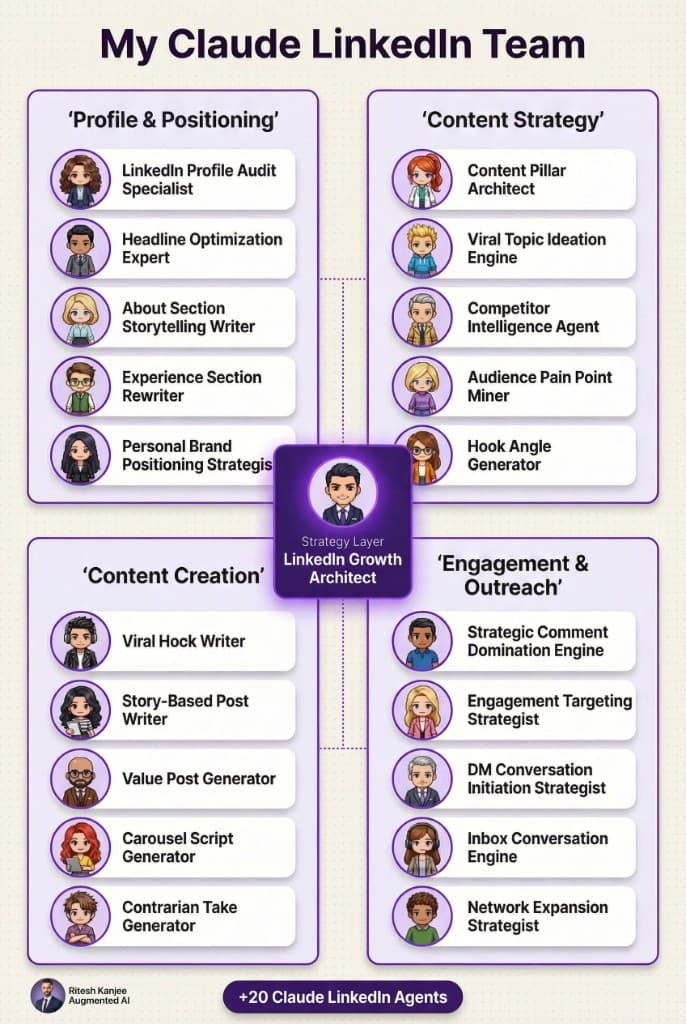
The Claude LinkedIn Team gives you 50 specialist AI agents for profile positioning, content creation, audience research, engagement, DMs, and conversion. Instead of using Claude for one-off prompts, you can turn it into a repeatable LinkedIn growth system that behaves more like a specialist team than a general assistant.
What is inside the 50 Claude LinkedIn Agents pack?
The pack is built as a structured LinkedIn operating system. Each agent handles one job, which makes the workflow easier to run, easier to improve, and easier to delegate inside Claude Code or OpenClaw.
- Profile and positioning agents for profile audits, headlines, About sections, experience rewrites, and personal brand strategy
- Content system agents for hooks, story posts, value posts, carousels, contrarian takes, and topic ideation
- Research agents for competitor analysis, audience pain points, ICP building, keywords, and trend spotting
- Engagement and outreach agents for comments, DMs, inbox handling, network expansion, and social proof
- Lead generation agents for qualification, funnel design, objection handling, proposals, and follow-up sequences
- Analytics agents for growth tracking, A/B testing, attribution, and weekly review
How are the 50 agents organized?
The system is grouped into six departments, with one orchestration layer sitting across the whole workflow. This makes it easier to know which agent to call first and which agent should handle the next task.
| Department | What it covers | Why it matters |
|---|---|---|
| Profile & Authority | Profile audit, headline, About section, experience rewrite, positioning | Improves first impressions and profile-to-conversation conversion |
| Content Engine | Hooks, story posts, value posts, carousels, contrarian takes, ideation | Gives you a repeatable content pipeline instead of posting ad hoc |
| Audience & Research | Competitors, pain points, ICP, keywords, trends, social listening | Helps your content and offers match what buyers already care about |
| Engagement & Outreach | Strategic comments, DMs, inbox management, network expansion | Turns visibility into real conversations and pipeline activity |
| Lead Gen & Sales | Qualification, call prep, objection handling, proposals, follow-up | Moves LinkedIn activity closer to booked calls and revenue |
| Analytics & Optimisation | Performance analysis, testing, attribution, weekly strategy review | Shows which activities are actually driving growth and sales |
Who is this LinkedIn AI team for?
This resource is best for founders, consultants, agency owners, coaches, recruiters, and operators who want a stronger LinkedIn system without hiring a full content or SDR team. It is especially useful if you already know LinkedIn matters, but your posting, outreach, and follow-up still feel inconsistent.
How do you install these agents into Claude Code?
Claude Code works best when each agent is treated as a reusable specialist prompt or skill. The goal is not to dump all 50 agents into one prompt. The goal is to keep them modular.
- Step 1: Download the pack from the Google Drive link and unzip it locally.
- Step 2: Keep each agent definition as its own Markdown file so Claude can reference one role at a time.
- Step 3: Add the agent files into your Claude Code project skills or prompt library folder so they can be called as reusable specialists.
- Step 4: Start with one orchestrator and 3 to 5 core agents, such as profile audit, content pillar architect, viral hook writer, DM initiation strategist, and lead qualification specialist.
- Step 5: Run them in sequence. For example: profile audit first, positioning second, content pillars third, post writing fourth, outreach fifth.
- Step 6: Save your best outputs and refine the prompts over time instead of rewriting the whole system each session.
How do you install these agents into OpenClaw?
OpenClaw is a better fit if you want persistent specialist agents, longer-running workflows, or a more team-like orchestration setup. The same pack can be mapped into an OpenClaw-style multi-agent workflow.
- Step 1: Download and unzip the pack.
- Step 2: Import or paste each agent definition into your OpenClaw skills or agent folder.
- Step 3: Assign one top-level orchestrator agent to route work across the other LinkedIn specialists.
- Step 4: Group agents by department: profile, content, research, engagement, sales, and analytics.
- Step 5: Build one workflow at a time. A good first workflow is research → hook generation → post writing → CTA optimisation → DM follow-up.
- Step 6: Keep your system lightweight at first. You do not need to run all 50 agents on day one.
What is the best way to use this pack?
The fastest way to get value is to use the pack as a decision engine, not just a writing engine. Let the agents tell you what to post, who to target, what pain points to address, and how to move conversations toward booked calls.
- Use profile agents first to improve conversion from profile views
- Use content agents second to build a posting system
- Use research agents to sharpen messaging and trend awareness
- Use outreach agents to turn visibility into direct conversations
- Use analytics agents to find what actually produces revenue
Why does a specialist-agent setup work better than one big prompt?
One big prompt usually creates vague output because it tries to solve too many jobs at once. A specialist-agent structure improves quality because each agent has one clear role, one clear objective, and one clear type of output. That makes the system easier to test and easier to improve.
Download the LinkedIn agent pack
If you want the full pack, use this link:
Frequently asked questions
What are Claude LinkedIn agents?
Claude LinkedIn agents are specialist prompts or skills designed to handle specific LinkedIn growth tasks. Instead of asking Claude to do everything at once, you give different agents focused jobs like profile audits, hook writing, outreach, or lead qualification.
Can I use these 50 agents without OpenClaw?
Yes. You can use the pack inside Claude Code as reusable specialist prompts or skills. OpenClaw is helpful if you want more persistent orchestration, but it is not required to start using the system.
Do I need all 50 agents from day one?
No. Most people should start with 5 to 10 agents that solve immediate bottlenecks. The fastest wins usually come from profile optimisation, content planning, hook writing, DMs, and lead qualification.
Are these agents useful for lead generation?
Yes. A big part of the pack is built around comment strategy, DM initiation, conversation handling, and sales follow-up. That makes it useful for turning content into pipeline rather than just vanity engagement.
What makes this different from basic prompting?
Basic prompting gives you one-off outputs. This pack gives you a structured operating model with departments, specialist roles, and an orchestration layer. That makes it much easier to scale your workflow and maintain consistency.
Is this resource free?
Yes. This resource is free to download. You can use it to test a specialist-agent workflow for LinkedIn before building a larger content or outbound system.
Summary
The 50 Claude LinkedIn Agents pack is a free LinkedIn growth system built around specialist roles instead of generic prompting. If you want a cleaner way to improve profile positioning, content quality, DMs, and conversion, this resource gives you a practical place to start.